Category: Cool Features

No more Home button?

1409219258_support-px-png


It’s that time again folks – New iPhone rumor time!! This time? We’re talking the Home Button, or rather, the distinct possibility that an upcoming update of the iPhone will not have one.


Whha?


Yup. But probably not the iPhone 6S, 6S Plus, and 6C. Instead we’re looking at having an iPhone equipped with a new chip that will have the touch ID directly on the touchscreen in 2016 or 2017.


The tech will apparently be built within Apple instead of being outsourced and will perhaps be integrated with the Apple Watch’s Force Touch technology — which can tell the difference between a light touch and a stronger press — to bring all the other functionality of the Home Button over to the new home buttonless screen.


Interesting.


Future tech of the week – glowing condoms!

condom


What are the youth of today up to? Skateboarding, graffity and talking back to crappy chemistry teachers? Nope! Well not these ones anyway- some hella smart kids in the UK have come up with – and been awarded for –  a conceptual condom that changes colors when they come into contact with STD’s.


Wot.


Yup – It’s called the S.T.EYE and it was created by a group of 13 and 14 year olds from London’s Isaac Newton Academy in pursuit of making detecting harmful STDs safer than ever before without invasive testing.


The condoms use a built-in indicator that changes to a different color depending on the bacteria or infection it detects. Think green for chlamydia, yellow for herpes, purple for human papillomavirus, or blue for syphilis.


Molecules in the condom attach to the bacteria of common STDs, causing the contraception to fluoresce in low light. The product is still in conceptual production.


Future tech to the rescue! And to….  a bunch of super awkward moments.


Get Gmail’s new feature!

exclamation mark


Answering all of our email specific prayers, Gmail has just rolled out a new feature that will prevent all kinds of brain fart mix ups. Yup, we’re talking about the ‘undo send’ feature. Yess.


If you’re a Gmailer – go to settings, click “General,” and check the box that says “Undo Send.” When you do find the need for the feature, you’ll still have to act quick, with the choice of four time frames – five, 10, 20, and 30 seconds – before the undo send is no longer feasible.


This feature is currently only available on the web version of Gmail.


iPhone balloon case

Need a phone case real quick? No, we can’t think of why you would either, but hey, life’s weird, so better to be prepared, right? Right!


Now, you have your trusty balloon handy, right? Of course!


Inflate that sucker, place your phone on top, slowly deflate the balloon, and Voila! Nifty emergency iPhone case.


Watch below.


APP OF THE WEEK!

There are so many good movies out right now! Can anyone say Super Summer of blockbusters? We LOVE that feeling of sitting in the dark movie theater with a bunch of friends or that special someone, suppin on a 44 oz Coke, munching on some delish corn, just about to watch some thrills and bangs…


BUT


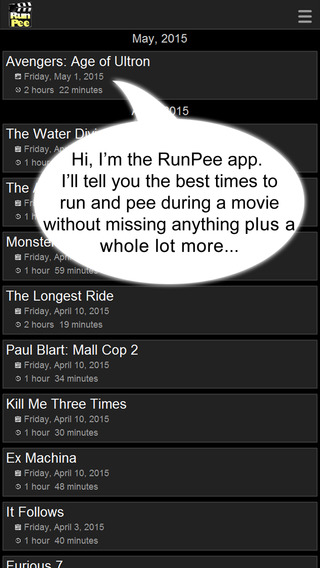
That feeling only lasts as long as the coke does in your body. Wanna know when to go pee in a movie? We got you!


screen568x568


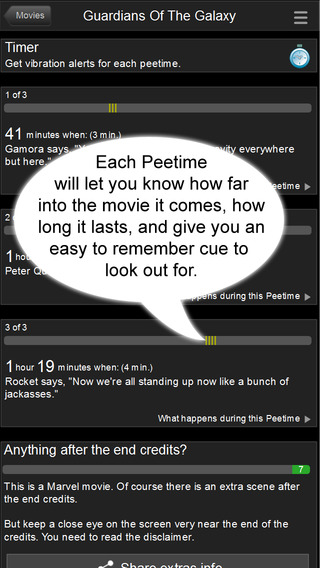
This app will save your blockbuster seein’ a**  this summer! It will tell you the best times to relieve yourself in any of the movies the day they’re released to theaters – and includes a rundown of the bits you missed whilst said relieving is being done!


screen568x568 (1)


Sweet. Download it here. It’s FREE!


Apple’s celebration of it’s App Store!

If you missed last week’s WWDC keynote, then you missed Apple’s self-congratulatory dialogue about the App Store and all of the life-changing Apps that exist within it. The App store has grown from 500 apps to well over a million in just 7 years, and, yes, we do love ourselves some apps. Life changing ones, procrastination ones, fun ones, sexy ones, educational ones, stupid ones…. we love apps. Apps, Apps, Apps.


Watch the video to see just how much we love Apps!


Watch the mock WWDC backstage video!

To celebrate WWDC and show what all-round-knock-about-funny guys they are, today Apple shared their mock “Backstage” video starring Bill Hader as WWDC’s director, doing a run through of a very different WWDC kickoff to the one we saw.


It’s funny. Watch it!


WWDC runs through the 12th, with developers just like the ones in the video learning all they can to develop the apps of the future!


WWDC!

wwdc


Apple’s annual Worldwide Developers Conference kicked off this morning with CEO Tim Cook’s keynote speech which revealed a rather unsurprising list of updates and new services being rolled out.


As unsurprising as that list was, it should make Apple customers happy with solid OS updates, including that of the Apple Watch, as well as the introduction of a very strong competitor into the music streaming industry with Apple Music.


Click on the links below to get a detailed look at what we’ve got coming from Apple in the next couple of months.


iOS 9

OS X 10.11 – El Capitan

Watch OS 2

Apple Music & Beats 1 Live Radio Station.


Apple pay also got a couple of updates: The ability to support rewards and loyalty cards, compatibility with Discover cards, a massive launch in the UK and Square is launching a special reader that will allow small businesses to accept Apple Pay.


You can watch the whole keynote yourself here when it’s uploaded shortly.


Say hello to your new friend: iOS 9

ios9


iOS 9 will be coming at your phone this Fall, and with it comes an array of improvements designed to make your life better! Here’s what you need to know:


For the iPad exclusively, iOS 9 brings a function called Slide-over, which will let you open apps without leaving the one that you’re in,  a brand-new QuickType keyboard, and a picture-in-picture feature that allows you to watch video from another app while you do something else.


There’s also a multi-tasking function called ‘Split view’ which lets users use 2 apps at the same time, on the same screen. This is a yay moment for iPad users everywhere – except it’ll only be available on the iPad Air 2… Bummer. Kudos to you iPad Air 2 owners.


For both iPhones and iPads, we get a better looking and more helpful Siri, a brand new Search window, which offers commonly used apps or contacts, one-tap links to nearby locations and breaking news, and – finally- transit directions in Maps and integrated with Siri.


*Siri will now react to context, which is a little scary – offering to play music when headphones are plugged in, or searching email when an unknown phone number calls and displaying it if found.


*There’s a new ‘News’ app for reading news stories, sourced from (so far) ESPN, Politico, the New York Times, Conde Nast publications and local news.


*A new optional iCloud Drive app on iOS that will let users access files stored in iCloud Drive.


* Passbook has been renamed Wallet.


*Notes has a bunch of shiny updates and additions, including new formatting options,the ability to add links, maps, and photos directly into the app, checklists, and sketching tools.


* iOS 9 brings us the ability to browse through images quickly using the new scrubber for iOS Photos.


* Find My Friends and Find My iPhone are both default apps in iOS 9 and come installed automatically.


*When setting a Passcode in iOS 9, you’ll be required to enter six digits instead of four for increased security.


* Exciting video stuff! .With iOS 9 you’ll have way more options-  720p HD at 30 fps, 1080p HD at 30 fps and 1080p HD at 60 fps for standard video and 720p HD at 120 fps or 720p HD at 240 fps for Slo-mo.


* THIS ONE IS REALLY EXCITING TO US but may not be for others… with iOS 9 you’ll have the ability to add email attachments to messages in the Mail app, which sources documents from iCloud Drive. SWEET! BECAUSE WE LOVE ATTACHING THINGS TO MAIL.


*Extended battery life. 1 hour additional battery life for the iPhone 6, PLUS a Low Power mode that will extend battery life for 3 hours. The time it takes to download its latest software updates is reduced and AWESOMELY  and ABOUT TIMELY, downloading iOS 9 will only require 1.3 Gb of spare space on your device.


*In order to save battery power, if your iPhone is facedown on a table, it will not turn the screen on, even when a Notification is received.


To sum things up-  a pretty solid if unexciting update to the iPhone and iPad operating system. Sign up here if you’re interesting in testing out the public beta which will be available in July, however we’d recommend waiting until after the public release of the more stable version in the Fall.


iOS 9 will be available for iPhone 4S and up, as well as iPad Air 2 and iPad Mini 2/3.


Salute El Capitan! OS X 10.11

el capitan


After last year’s OS X Mavericks named after the beach break south of the Bay, Apple introduced us all today to OS X El Capitan, named, of course, after the stunning, big a** rock found in Yosemite.


El Capitan brings with it a few cool things that will probably make your life easier.


* Split view! Work in two apps at the same time on the same screen!


*Less exciting, but still useful – when you lose your curser, shake your finger back and forth on the trackpad or give your mouse a shake, and the cursor gets bigger so it’s easy to spot.
*A new pinned feature in Safari lets users keep websites listed at the top of the window, similar to a bookmarks bar. There will also be a mute feature that will function even with several tabs open.


* The Notes app gets the same updates as in iOS 9, with checklist ability, and ways to add a photo, video, URL, or map location to a note. All your notes are kept up to date across all your devices on the cloud.


* The new Mail app features enhancements to its full-screen mode, tabs in the compose window, the ability to hide in-progress messages and go back to the main Inbox. There are also new gestures built into Mail for archiving and deleting — simply swipe on the trackpad.


* The Photos app will come with support for third-party editing extensions and tools that will be available from the Mac App Store and accessible right in the Photos app.


* Spotlight search goes deeper into our souls with a higher level of understanding, contextually aware search results from a greater number of sources.


* Metal for Mac has arrived, with 50% improvements in rendering with 40% less CPU processing power required for graphics. Metal on OS X El Capitan offers better battery life and improved graphics performance for both games and professional apps. It will also make it up to 1.4 times faster to launch an app, up to 2 times faster to switch in-between apps, up to 2 times faster to display email addresses and up to 4 times faster to open a PDF in preview.


OS X 10.11 El Capitan is available to registered developers today. For the rest of us, it will be available in public beta in July and will publicly launch in the fall. For FREE! Yessir!