Category: iPhone 5

iPhone Tip Of The Day! How to lock your screen orientation!

Sometimes, we wanna look at the world like this:


Horizontally! ( Cos it’s like the horizon, see?)


Sometimes, we wanna look at the world like this:


Vertically! (Coz, it’s, like, vertical)


Your iDevice does both! Magic! Your device should switch from vertical to horizontal orientation depending on at what angle you’re holding the device, and it should choose the view based on what is best for you at that point in time.


But.


It does get it wrong, sometimes. Sometimes you’re lying in bed and reading and it decides that BAM NOW YOU SEE THINGS THE OTHER WAY.


Except sometimes looking at life from a different perspective is just realllllly annoying, stupid orientation moving the wrong way.


So here’s what you do! In iOS 7- simply drag the control centre from the bottom of the screen. Three quarters along to the right you’ll see a lock symbol. Like this:


Angle your iDevice so it’s vertical/horizontal- however you want it to be for task you’re doing (playing mushroom wars does SO count as a task). Press the lock and it will say Orientation Lock on. Press it again and it will say Orientation off.


In iOS 6, press the home button twice. This will bring up the dash, which, if you swipe to the right you’ll see the same lock as pictured above. Press it on and off to turn the orientation on and off.


CAKE!


mmmm cake…


Images courtesy of  Gizmodo.com.au, imore, findyourmiddleground.com, osxdaily.com & Solofoods.com

iPhone Tip Of The Day!


Wassup kids? IT’S ALMOST THE WEEKEND!!


Want an extra way to see all the phone calls and text messages you’re getting inviting you to awesome parties this weekend?


We got you!


Your iPhone can give you a visual alert for incoming calls and texts. Just go to Settings > General > Accessibility and turn on LED Flash for Alerts.


It’s like your phone’s already getting the party started!!


Image courtesy of Quickmeme.

iPhone Tip Of The Day!


iOS 7 Users!


Want to block that pesky ex girlfriend/boyfriend/odd person who you used to say hello to in gym class and now calls you just to say ‘uh, so whatsup best friend forever?’


Yes siree you do!


Here’s what you do.


Settings > Phone > Blocked. Add their phone number to the list.


No more of this!  ( On the phone at least).


Your welcome.


Image courtesy of Memestache

iPhone Tip Of The Day


In iOS 7, swiping right to left will get rid of a notification without opening it!


Image courtesy of Quickmeme

Smartphone Users, By The Numbers

INFOGRAPHICS! YEAH! These things make everything fun to read what with the colors and the shapes and the little pointy arrows!


We give you the best fun of 2014 so far- Smartphone infographics!


YEAH!


This Infographic is produced by Coupon Audit (provides Converse promo code) and iPhoneAntidote – Sell Your Cracked iPhone


The fastest growing iOS game in History?


We don’t really know about this guys. We want to tell you about this game, but then we think about the consequences.


There will be lots of work not being done. Everywhere. Everywhere, everyone will be playing this game and not doing work. Society might break down.


But then we think of the positive’s, which are 1. It’s fun. 2. It’s not a solo player game and therefore can be enjoyed socially,  3. It can make you learn and 4. It’s CHRISTMAS! So we encourage playing!!


But here is your warning: It’s super, super addictive.


The game is called QuizUp. 


Despite only being a smidge over 3 weeks old, the game is the fastest growing mobile game. Ever. It’s made by some crazy Icelandic magicians and it already has 3.5 million registered users (and growing). The average player plays for 40 minutes a day. The average player. 40 minutes. It’s worth repeating that particular stat.


You can register using Facebook ( with the usual game access to basic information and friend list) or using your email address.


If you sign up using FaceBook, you’ll have your profile picture showing to your opponents, but just in case you don’t want your profile picture associated with the fact that you don’t know which movies Bollywood comedian Johnny Lever has NOT acted in, then you can change it to a cute logo of an octopus, or a sad panda.


Not really like that, but awwww.


The Gameplay itself is fast and clean. It’s your basic quizzy, general knowledge game, with a format that will be intuitive to you if you’ve ever watched Who Wants To Be A Millionaire or played Trivial Pursuit. Once you start playing you are given categories to choose from.


The categories are what you would expect and way, way more. They’re fluid with user submitted questions being added daily ( without the app needing to be updated!), and they are specialized, with categories ranging from Geography to European Countries to Fruits and Vegetables, to Biology. We could go on. So far there’s over 200,000 trivia questions.


If you sign in using Facebook, categories will be suggested to you using the basic information on your Facebook profile. For example, the category ‘The 49ers’ was suggested for iPhone Antidote. Because the 49ers rock, obviously.


Once you choose a category, you are set against another player and given multiple choice questions. You get points for answering correctly, and you get more points for answering correctly quickly. You have to beat the other person’s amount of points by the final question ( you get double points for getting the last question correct), and then you win.


Yay. And then you play again because you feel smart. And again because then you got too cocky and lost and you want to feel smart again.And so on. And on.


The more you play, the more XP you gain and you can then move up a leader board against both your Facebook friends and on global, local, country-by-country, and state-by-state lists.


For every category there is also a message board which so that those particularly passionate about the Herbs & Spices category can talk about it after a game if they feel the urge.


The game is free, but don’t worry, you won’t be annoyed by ads or be feeling the need to buy more lives or make any other in-app purchases. Plain Vanilla has partnered with brands who then create sponsored games, so you might end up playing a category sponsored by the Twilight Brand. And then you can show off everything that you know about Twilight. Like how Edward the Vampire is actually..something something.


Right now, QuizUp is only available for iOS. (An Android version is coming in January.) Get it in the App store!


Play away kids, but don’t say we didn’t warn you about the addiction!!


Oh, and try and find us on there, we’re a sad octopus and we’re really good at European countries.


Images courtesy of Pando, 8Tracks, Perezhilton & Bitcointalk.

Christmas Gift guide Part 3 – Tips & Tricks for buying tech this Christmas!


We told you we loved Christmas right? We also really like deals. Deals, tips, tricks, writlefifers, all of it. This is why we now proudly present the Christmas Gift Guide Part 3 – Tips & Tricks for buying Tech this Christmas!


( See our other Christmas Guides, Part 1 -Comprehensive Holiday Tech Gift Guide and Part 2 – The Really Really Expensive Gift Guide.)


According to Macrumors, Apple now has an official policy on price matching, which allows specialists to price match iPhones, iPads, and Macs, giving up to 10 percent off on products without authorization. Specialists are also allowed to give business customers up to 20% off a non-Apple accessory when purchased with an Apple product via special order.

Apple also has free shipping now through December 22nd.


If you’re thinking of buying that special someone a Smartphone this holiday season, you should get yourself along to Whistleblower – a fantastic tool that you can use to compare cell phone plans online, and see which one is best for your needs and your budget!


If you use Amazon ( and you should)  you should be aware of a couple of things. Firstly, they will price match on cell phones and televisions within 14 days of shipment of the product.  Click here to see the details. 


Amazon also offers 3-months of Amazon Prime Membership for free for parents & caregivers. This includes Free 2-day shipping on qualifying items, 30% off Select Diapers & Wipes which qualify for subscribe & save (15% discount + 15% S&S discount, an additional month of Amazon Prime for each $25 you spend on a single order (up to 1 year total of free prime) and exclusive e-mail discounts and offers.

Click here to check it out.


If you’re a college student you can also get free Prime membership for 6 months and only $39/year after that as well as a $5 credit for each friend you refer.  Click here to sign up.


College students should also click here to apply for Best Buy’s student discounts, all you need is your student email address ( must end in .edu). With this, you’ll save $50 on MacBooks and receive similar discounts in your email.


College students also save up to $200 off a MacBook with Apple’s education pricing.


You guys should definitely check out the refurbished products on the Apple special deals page here. You can find deals like the iPad Mini Wifi 64 Gb with a 1 year warranty for $419, 13 inch MacBook air for $849, or Apple TV for $75.


Target’s markdown day is usually Monday for electronics. Markdowns usually take place every two weeks and items will continue to be marked down every two weeks until sold or the discount reaches 75 percent. Markdown schedule’s might vary from store to store, so it won’t hurt to check.


You can get a bunch of sweet Mac applications all in one go from MacUpdate in corroboration with Macrumors. For only $39.99, the bundle includes 10 applications such as iStopMotion 3, Anonymiser, and Backblaze. All up it’s worth a cool $360 clams.  Click here to check out the deal.


And here’s a couple of specific deals you should check out:


iPad Mini and iPad Mini with Retina Display Smart Cover by Apple – 19.99 for blue, 14.99 for all others including Red. Free Shipping. Click here to see the deal. 


Pioneer A4 WiFi Speaker w/ AirPlay Streaming $80 + Free Shipping save $120! Check it out here.


Get a Apple 15.4″ MacBook Pro for $1549.99 with a discount and rebate at MacMall.


Happy dealing and Writlefifing and Merry Christmas!


Images courtesy of Freechristmaswallpapers & Hqwallbase.com

Black Friday deals


Yay!


Here’s a couple of excellent, techy, exciting, WONDERFUL  Black Friday deals for y’all  to look out for!


1,


Walmart will have the 16GB Apple iPad Mini + $100 Walmart Gift Card for $299.00.


Apparently they will have stock guaranteed for 1 hour BUT you can’t use the gift card on the mini. Walmart says they will price match but you must have the ad and the store must be open with their sales starting when you try.


Walmart, opens at 6 p.m on Thanksgiving day.


2,


Target  will have the iPad Air 16GB w/ WiFi + $100 Target Gift Card for $479.00 for Black Friday.


Target opens at 8 p.m on Thanksgiving day.


It also seems that both online and in-store shoppers get a 20% gift card if they spend at least $75 between Thanksgiving and end of business on Black Friday. The gift card can be used Dec. 1 to Dec. 7.


It’s almost here!


Image courtesy of CNNsomepets.com

The first guy to break his 5S

We just received our first iPhone 5S!  And it was, drumroll please:


Cracked!


Even though the guy at first was like:


We gave him $$$ CASHMONEY and turned that frown upside down!


Apparently, our lovely 5S customer was using his brand new shiny iPhone 5S in a crowded area, someone came running by and hit him in the shoulder and the shiny 5S went flying ever so prettily before smacking itself onto concrete. And there you have it- a cracked screen.


In his own words, just a bit of bad luck.


But good luck that he had heard of iPhone Antidote! Yay!


If you have an unlucky cracked or broken iPhone, or a stinky old used iPhone, go to iPhone Antidote right now!


We’ll give you CASHMONEY for those unlucky, stinky old iPhones and turn you from grumpy cat into happy, baller cat in one of the easiest, stress free transactions you’ll ever experience!


Images courtesy of Phonearena, Geeknation, Lol-cat & Pandawhale

All the cool teenagers have iphones


Are you a cool teenager? Do you have an iPhone? Well, uh, sorry, cos we’re sure this might not be what you want to hear and all…. but you’re now in the majority!


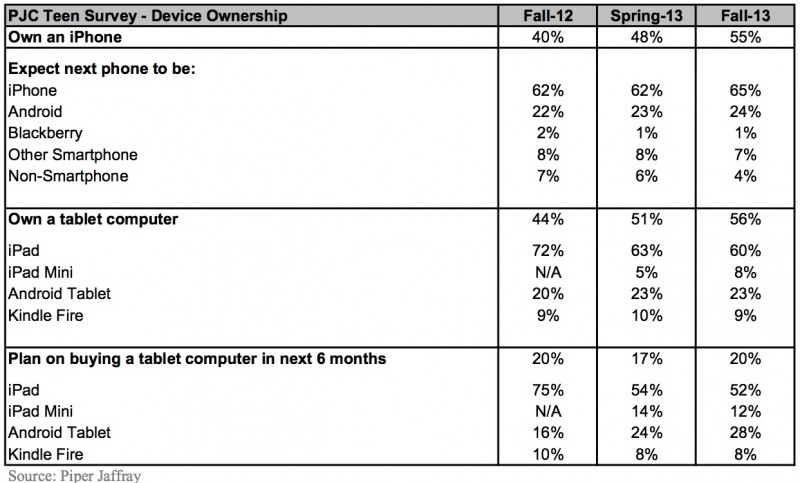
According to a survey administered by Piper Jaffray analyst Gene Munster, 55% of teenagers now use an iPhone. This is up compared to 48% in an April survey and 40% this time last year.


“Our most recent semi-annual Teen survey demonstrates that Apple remains the most popular tech brand amongst teens. As of Fall 2013, the iPhone represented nearly 55% all phones used by teens and the iPad family remained at close to 70% share of tablet ownership.


We believe that while Samsung seemingly had some momentum with teens over the past year, Apple’s brand and product quality has enabled it to remain the top choice for teen consumer electronics.”


Here’s the table of results straight from the sauce!


teensurveyiphonesipads


Mmmmm… sauce.


We mean… yay Apple! Way to keep ahead in one of the most important demographics!


And take THAT other smartphone companies for suggesting, like we know you have, that Apple products are for uncool parent type people!


Hey! Everyone’s cool in our books! As long as everyone accepts Bill Murray as their cool King. K? K.


Image courtesy of Rogerfields.comfoodnetwork.com & Imgur.