Category: Uncategorized

Apple staff promotions


iPhone Antidote favorite Jony Ive has been promoted to a newly created title at Apple, becoming the Chief Design officer, whilst the day to day management of the design teams was given to Richard Howarth and Alan Dye, promoting them to Vice President positions.


This gives Jony the time and space to delegate and focus on the broader idea of design for Apple across hardware and software, all the way through to packaging, retail store aesthetic and new whole product ideas without needing to deal with the administrative and managerial work associated with it.


Congratulations Jony! Congratulations Richard and Alan.


Here’s the Apple- wide email CEO Tim Cook sent regarding the promotions.

 
Team,


I have exciting news to share with you today. I am happy to announce that Jony Ive is being promoted to the newly created position of Chief Design Officer at Apple.


Jony is one of the most talented and accomplished designers of his generation, with an astonishing 5000 design and utility patents to his name. His new role is a reflection of the scope of work he has been doing at Apple for some time. Jony’s design responsibilities have expanded from hardware and, more recently, software UI to the look and feel of Apple retail stores, our new campus in Cupertino, product packaging and many other parts of our company.


Design is one of the most important ways we communicate with our customers, and our reputation for world-class design differentiates Apple from every other company in the world. As Chief Design Officer, Jony will remain responsible for all of our design, focusing entirely on current design projects, new ideas and future initiatives. On July 1, he will hand off his day-to-day managerial responsibilities of ID and UI to Richard Howarth, our new vice president of Industrial Design, and Alan Dye, our new vice president of User Interface Design.


Richard, Alan and Jony have been working together as colleagues and friends for many years. Richard has been a member of the Design team for two decades, and in that time he has been a key contributor to the design of each generation of iPhone, Mac, and practically every other Apple product. Alan started at Apple nine years ago on the Marcom team, and helped Jony build the UI team which collaborated with ID, Software Engineering and countless other groups on groundbreaking projects like iOS 7, iOS 8 and Apple Watch.


Please join me in congratulating these three exceptionally talented designers on their new roles at Apple.


Tim


Who does Tim Cook follow?

1409219258_support-px-png


CEO of Apple, Tim Cook, is a fairly important and influential man in the scope of the tech world, yeah? He’s in charge of one of the wealthiest and most successful companies in the world, and an advocate of change towards workplace (and life-place) equality for all.


So who does he think of as important? Who does he look to? Social media will help us!


Cook currently has 1.14 million followers on Twitter (his preferred public social media forum) however he only follows 37 people. It’s said that who you follow on Twitter (especially when it’s such a small select group) is pretty telling, so let’s have a look, Mr Cook:


1 – Human Rights campaign – Civil rights organization working towards LGBT equality.


2 – The Official Twitter account of the United Nations Human Rights office.


3 – Satya Nadella, CEO of Microsoft Corporation


4 – The band One Republic 


5 – Aaron Levie, ‘Lead Magician’ (and CEO) at Box, a company that allows you to ‘Access, manage, and share your files securely from anywhere’


6 – Auburn University Tigers Football team.


7 – American Journalist David Muir


8 – Dick Costolo, CEO at Twitter


9 – The National Football Foundation


10 – Scientific American – the ‘authoritative source for the science discoveries and technology innovations that matter.’


11 – College Game Day


12 – Angela Ahrendts, Senior Vice President, Apple Retail.


13 – Duke Men’s Basketball.


14 – Charlie Rose from the Charlie Rose Show.


15 – National Parks Foundation – official Charity of America’s National parks.


16 – iTunes U on Twitter


17 – iTunes on Twitter


18 – ESPN on Twitter


19 – RED Charity ‘Harnessing the power of people & companies to fight AIDS.’


20 – TED Talks – ‘ Ideas worth Spreading’


21 – iBooks on Twitter


22 – iTunes Movies on Twitter


23 – The Daily Show with Jon Stewart


24 – The App Store on Twitter


25 – iTunes Music on Twitter


26 – Nike 


27 – Former President Bill Clinton


28 – Pope Francis


29 – The Southern Poverty Law Center in Alabama.


30 – The Auburn Plainsman, Auburn University’s student-produced news source.


31 – Duke Basketball, Coverage of Duke Basketball from The Chronicle, Duke’s independent daily student newspaper.


32 – Robert F. Kennedy Human Rights, a nonprofit organization working to realize Robert Kennedy’s dream of a more just & peaceful world.


33 – American Journalist Anderson Cooper


34 – Philip Schiller, senior vice president of worldwide marketing at Apple Inc.


35 – Eddy Cue, Apple’s senior vice president of Internet Software and Services


36 – Jimmy Fallon


37 – Kerry Kennedy, President, Robert F. Kennedy Human Rights 


So, it seems like Mr Cook is into Apple (Duh), sports, his Alma Matter Auburn University, sports, tech, news, news oriented comedy shows, charity, and making the world a better place.


What a good guy.


Don’t like the band your apple watch came with? It’s ok!


apple


So, you’ve got your shiny new toy, the Apple Watch, in your grasp, and you love it. We mean, you love it. But…something’s a little off. You’re not too sure about the band, are you? Little too green? Were you unaware until now that your wrist swells up all weirdly when you play tennis and it doesn’t fit right?


Well, you’ve got some options, friend. Apple will allow you the opportunity to exchange your Apple Watch band for another style! Yay! Unless you have the Apple Watch Edition, or you purchased your Apple Watch at a non-Apple retailer. Bowboooow.


Here are the rules for band-swapping:
– The new band must be within the same collection as the watch and must be an available band option for that watch face.

– The band swap is within 14 day return period.

– The watch must have been purchased at the Apple Online Store, Kiosk, or Apple Store App.

– You are not using band swaps as a way to configure a sellable product for a customer.


The swap must be initiated through the Online Store call center who will create a new band order for you, ship it out, and provide instructions on how to mail your old band in for a refund.


You will not be able to return a Apple Watch band by itself for a refund, and you can’t return an Apple Watch without the band.


iFixit teardown of the Apple Watch


The good people over at iFixit have performed their all-serving ritual of tearing apart new tech, giving the Apple Watch a repairability score of 5/10.


Somewhat expected for an Apple product.  If you’re interested to see the guts of the Apple Watch, check out the teardown here:


Thanks iFixit!


Watch the new Apple Watch Ads!


Just in time for the official release of the Apple Watch, Apple has released a set of three ads celebrating their new wearable tech. Cue sappy romantic music, heartfelt emotions, and ‘grass is greener with an Apple Watch’ themes.


Time to FEEL!


Who wants an Apple Watch now? Huh? Huh?


How to set up and use your Apple Watch!


apple watch


Did you get a shiny new Apple Watch today?  HERE’S HOW TO USE IT!!


First things first: Make sure you have an iPhone 5, 5s, 5c, 6, or 6 Plus running iOS 8.2.


Secondly things secondly: Your watch should come with about 50% charge, but charge your watch if it needs it.


Power on the Watch by pressing the side button, and follow the prompts to select a language etc. Launch the Apple Watch App on your iPhone (it was automatically installed when you updated to iOS 8.2) and Tap “Start Pairing” on the main screen. Hold your watch up to your iPhone’s camera so the screen is aligned with the yellow outlined box on your iPhone’s screen, and follow the instructions on your iPhone screen.


If you open the Settings App on your shiny new watch, you’ll find the options to customize your brightness, sound, text size, silencing ability, and Do Not Disturb functions.


IMG_6730


Your new best friend is the Digital Crown. Tap it to get back to the home screen, use it to zoom in maps/photos, press it in conjunction with the side button to take a screen shot, press and hold to activate Siri, and double click it to jump to your most recently visited app.


Your second best friend forever is the SWIPE! YES! Swipe up from the watch face to see what Apple calls ‘Glances’ which contains information such as calendar events, weather, heart rate, location, and the ability to access the option to ‘Ping’ your misplaced phone.


Swipe down to see your notifications. Swipe left on a notification to quickly clear it. Check your heartbeat by swiping up to expand Glances and swiping left to the heartbeat card.


Tapping is the cool guy you thought you knew that has a surprise twin brother that seems pretty cool. The Watch is pressure sensitive, so light tapping will have a different effect than if you ‘force touch’ – a slightly longer, firm press.


There are a number of uses for the force touch that become more apparent the more you play with the device. For instance in the maps app, you force touch to get to the search feature. Force touch the watch face to change its design, or on the notifications ‘red dot’ to clear them all, or on the Messages inbox to compose a new text.


IMG_6727


In Glances, tap to get more information on any of the applications.


Raising your hand will activate the display and show you the time, the last notification if you’ve received one, or activate Siri if you say “Hey Siri” at the same time. Lowering your wrist after receiving a notification will dismiss it. Putting your hand over the watch face will silence an incoming phone call.


You can also use it to control Apple TV, which could be useful, and also could be super annoying to anyone else in the room (which, yes, can be excellent).


To use Apple Pay, double click the side button and hold the face of the watch near the card reader. POOF, MONEY EXCHANGED!


We’ll be bringing you more Apple Watch updates and user guides as we get to know more about the device, and in the mean time, you should also check out the Apple video guides here.


Happy Weekend Kids!


People have started to receive their Apple Watches!


As of this morning, many people have started to receive their Shiny Apple Watches in the mail, delivered by either UPS or Fedex.


delivery


Have you received yours yet?


You can buy Apple Watch in-store today !

IMG_6736


Today is the official Launch date of the Apple Watch, ( Yay!) however, as you may have heard, that doesn’t mean you can just walk in to any ol’ apple store and buy one.


Apple has restricted the purchase of Apple Watches to online only, meaning you can go in-store and check them out, however when you decide that you want one and which one you want, a kindly Apple employee will then be able to assist you in making your online purchase, and you’ll have to wait for your new shiny baby to be shipped.


Bummer, right? But wait – there’s more!  According to reports, there will  be retail stores where you can buy an Apple Watch on the spot. You’re looking at high end fashion boutiques for this one, including Dover Street Market in Tokyo and London, Maxfield in Los Angeles, Colette in Paris, the Corner in Berlin, and 10 Corso Como in Milan.


None of these stores will have the Apple Watch Edition available for on-the-spot purchase, and stock will be limited for the other models (likely in the 100’s).


The first people to get their hands on an Apple Watch apart from those lucky enough to scoop them up in one of the above fancy boutique’s will be those who were quick-handed enough to pre-order within the first few minutes of April 10th, however those who pre-ordered afterwards might be in luck, with Apple advising that more Apple Watches are shipping faster than expected.


Deals of the Week Friday!


Hi!!


Here’s some deals comin’ at your FACE~


* Got an Android lover in your life? Get them a Motorola Moto 360 Smart Watch for Android Devices with Leather Strap for just $179 PLUS Free Shipping from Amazon.


motorola smart watch


*Get a EF 24-105mm f/4L IS USM Refurbished lens for just $530.78  with free Shipping AND a 1 Yr Canon USA warranty. Normally this lens used would go for $600, but this is refurbished direct from canon and comes with a 1 year warranty. Check it out!


canon


*Get a $25 Prepaid Visa or $20 Amazon/iTunes card for test driving a Subaru! Go here to see where it’s available near you. Select new inventory in the header tab, choose Forester in the left side bar under MODELS (possibly Outback if Forester doesn’t work). Its a pop up ad so disable your blocker if you have it on.


*Grab a $75 eBay Gift Card for just $72 with free Shipping from Ebay ( duh.)


* Get a RCA LED 55″ 1080p 120Hz LED HDTV (55G55R120Q) for just $459.99 from Walmart, saving $240 big ones. Free shipping or in-store pickup.


* Got some fresh jams to listen to? Check out the Monoprice Premium Bluetooth Over-the-Ear Headphones with Microphone in Black. Use coupon code “DN5OFF” to get them for $19.98.  They can be paired with your phone as a hands-free device and feature a 30-foot range and automatic pause function. Deal ends April 20. From iTech Deals.

headphones


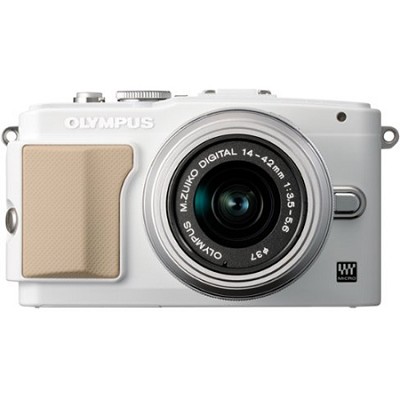
*Snap Happy? Get an Olympus PEN E-PL5 16.1-Megapixel Mirrorless Micro Four Thirds Digital Camera, model no. V205041WU000, bundled with the Olympus M. Zuiko Digital ED 14-42mm f/3.5-5.6 II R Lens in White for $279 with free shipping. From BuyDig.

camera

*Sears offers the GE Power PRO Series X450 16-Megapixel Digital Camera in Black, model no. X450-BK, for $49.98. $6.50 shipping fee, or free to pick up instore. From Sears. Hella good deal yo!

canonnn


T-Mobile offers two lines on its Simple Choice Plan, which includes unlimited talk and text, bundled with Unlimited 4G LTE Data and a Rhapsody unRadio Subscription for $100 per month. (Select two lines and the unlimited data options for each line; price shows during checkout. Additional lines can be added for $40 each.)

Note: Existing customers can get this deal by changing their plan to the “Simple Choice Unlimited 4G LTE Family Plan”. (Sign in to your account and click “Plan” and then “Change Plan”.) All lines on your plan must have unlimited 4G LTE to get the promotional price. Check it out! 


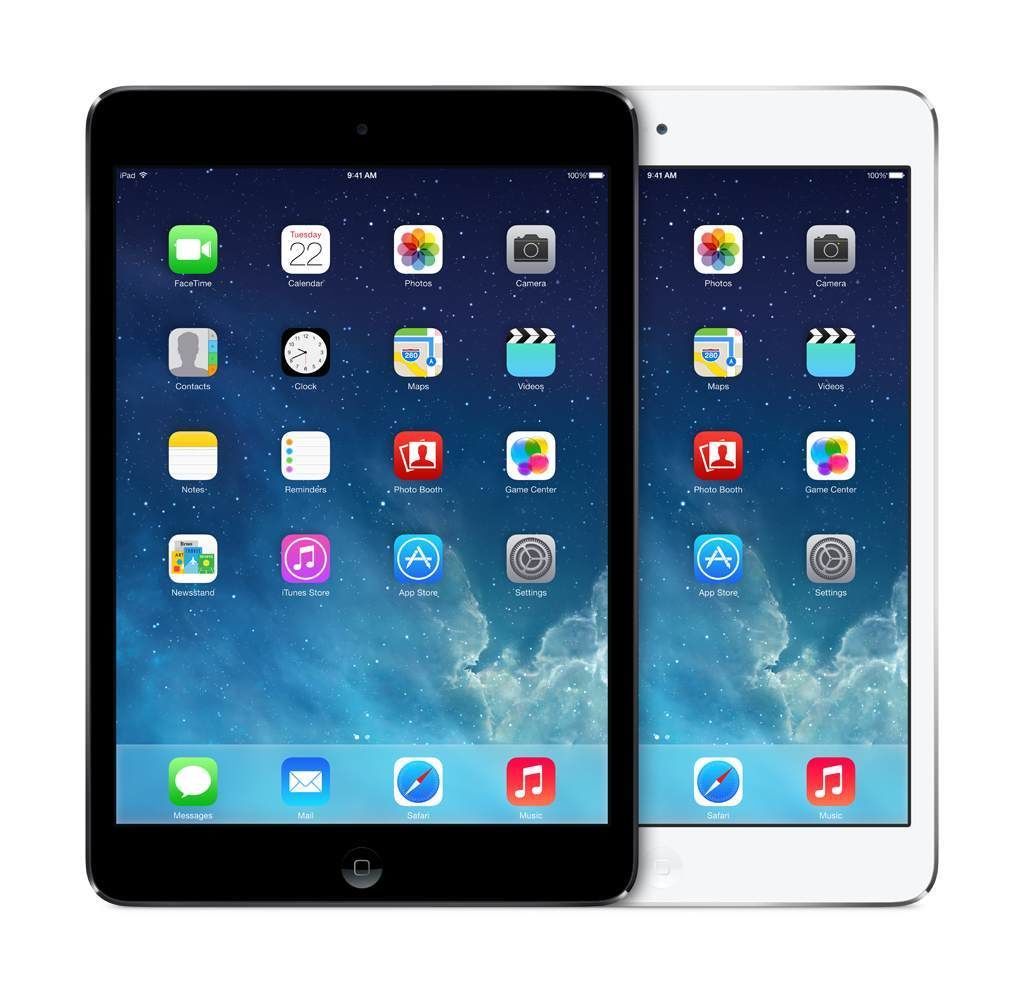
* Get your paws on an Apple iPad Mini 2nd Gen 32GB Retina Display Dual-Core 4G GSM Unlocked + WiFi – Refurbished for $250 with free Shipping from eBay.


ipad

Happy Weekend everyone!!!


WWDC dates confirmed!

wwdc


Apple today confirmed the dates for this years Worldwide Developers Conference, set to commence June 8th at the Moscone Center in San Francisco. Although Apple is always pretty vague with what the focus of each WWDC will be, all guesstimates point towards iOS 9 and OS X 10.11.


From the Sauce- Philip Schiller, Apple’s senior vice president of Worldwide Marketing:


“The App Store ignited an app ecosystem that is simply amazing, forever changing the lives of customers and creating millions of jobs worldwide,” said Philip Schiller, . “We’ve got incredible new technologies for iOS and OS X to share with developers at WWDC and around the world, and can’t wait to see the next generation of apps they create.”


Developers will flock to the 5 day show to take part in technical sessions, hands on labs, awards, and to attend the all-important key-note run by Tim Cook, CEO. In order to do so, they must apply for tickets in a lottery based system.


Are you a developer? You can apply here, beginning today until April 17th at 10:00AM PT, however you must have signed up to the iOS Developer Program, iOS Developer Enterprise Program or Mac Developer Program as of the WWDC 2015 announcement on April 14 at 5:30 AM PT to be eligible for a chance at tickets.


THEN, if you’re selected, you’ll be told by April 20 at 5:00PM. The tickets will cost $1599, but presumably are well worth their weight in clams. WWDC Scholarships are also available to students and members of participating STEM organizations around the world.


Apple will be streaming several WWDC sessions live for developers that are unable to attend, and the Keynote should be live streamed on the Apple Website and on Apple TV.


Other than updates to the operating systems, Apple is expected to announce the new Apple TV, the revamped Beats Music streaming service, and possibly the new iPhone updates.


Do you think anything amazing will be announced at WWDC? Or do you think they’ve used up all their 2015 allotment of amazingness with the Apple Watch?


Also important to note: Apparently selfie sticks are banned at the Moscone center. *gasp*