Category: Uncategorized

What to expect with the iPhone 6?

So, the iPhone 6, huh?  Um…Trumpets please?

 

3365753079_20de276357_m


Yeah! Awesome trumpeting. So, OHMYGOODNESS IT’S ALMOST HERE! The next generation in iPhone, the iPhone 6, will be announced and revealed on September 9th, at 10am, in San Francisco.


Here’s what we know, and what you should know, based on rumors and secret sources and leaked videos and expert guestimates and all kinds of mysterious things.


*There will be 2 models, with one size being a 4.7 inch and the other a 5.5 inch. This is quite significantly larger, compared to a 4 inch iPhone 5s.


*One or possibly both models will likely have sapphire crystal screens, which means they will be much stronger, scratch resistant and durable. If only one model has the sapphire crystal, it will be the larger 5.5 inch iPhone 6.


*They will both come with a faster and better A8 chip.


*The iPhone 6 is said to be thinner all round – smaller bezels and a much thinner body. The 4.7 inch model, for example, is said to be 6.9mm thick, compared to the current iPhone 5S which is 7.6mm thick. The 5.5 inch model is said to come in at around 7.1mm thick.


*One or possibly both models of the  iPhone 6 look likely to come with Optical Image Stabilization. This feature uses motion-tracking in order to compensate for device shakiness, providing for sharper photos and videos. If only one model gets it, it will be the larger 5.5 inch iPhone 6. That guy gets everything.


*There have been rumors and leaks indicating that the larger 5.5 inch iPhone 6 will have a 128GB storage capacity. See? The little guy, the 4.7 inch model appears to be confirmed to be starting with a storage capacity of 16Gb.


*Several leaked videos (which haven’t yet been confirmed as legitimate of course)  have shown the iPhone 6 as having rounded, tapered edges with redesigned speaker holes and a relocated power button on the top right hand side. The volume buttons are also shown to be more elongated, similar to how they are on the iPad.


*The colors of the iPhone 6 are assumed to be the same as the iPhone 5S – silver and gold, silver and white, and space gray and black.


*iPhone 6 is looking like it will come equipped with a mobile payments feature, powered by a NFC ( Near Field Communications) chip and assisted by the Touch ID. Reports have surfaced recently of Apple completing deals with all three big finance big boys – American Express, Visa and Mastercard to make this happen.


*Now – to the really important part – price! Reports indicate that the 5.5 lower end model will be $299 on contract, with the 4.7 inch model will be $199 on contract.


Originally it was thought that both models would be released on the same day, likely to be September 19th, but there are reports citing production problems, which, if correct, would mean that only the 4.7 inch model will be released then, with the larger 5.5 inch model being released later in the fourth quarter.


We will be advising you of the actually confirmed by apple completely legit features and functionality of the iPhone 6 on September 9th.


Yay!

 

7863032106_65c5c643bb_m


Elephant Nature Park by Christian Haugen is licensed under CC BY-SA 2.0

Happy Villy by Tambako The Jaguar is licensed under CC BY-SA 2.0

Drone films new apple campus!


Apple is building a new Campus in Cupertino. Although, similar to their product launches, they have tried to shroud the campus in as much mystery as they can, last week someone flew a drone over the building site and then uploaded it onto YouTube.


It doesn’t really speak volumes as to what the building will be like, but it is still interesting. And yes, this is the building commonly referred to as The SpaceShip Campus.  But we didn’t see any boosters.


P.S. We want a drone for Christmas. Please. And an iWatch.


Drone and Moon by Don McCullough is licensed under CC BY-SA 2.0

Alarmy is your new best friend! App of the YEAR!

Have trouble waking up sometimes? Is the snooze button your best friend/mortal enemy? Anything special you need to make sure you wake up for anytime soon? Like, iuno, the APPLE MEDIA EVENT ON SEPTEMBER 9TH? Or, you know, work or something?


We got you!


This has been described by some of us here at iPhone Antidote as the app that has changed our life the most so far this year ( hopefully soon to be eclipsed by the line of sight teleportation App)


Introducing Alarmy.


alarmy


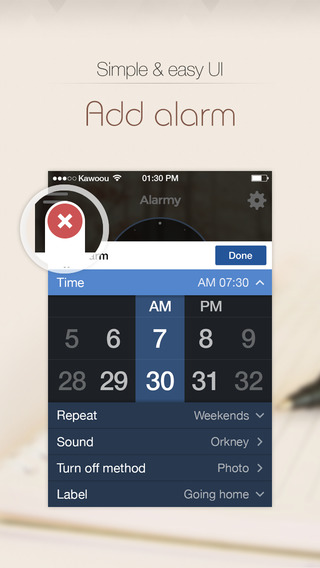
Alarmy is like a normal alarm clock that you set within the App on your iPhone or iPad. EXCEPT it won’t ever stop alarming until you do one of two things:


To turn off the alarm you can either shake the device super hard a number of times (95, for example), OR you need to take a photo of a previously designated object. For instance- Your shower head.


Then, and only then, will Alarmy stop trying to wake you up. You have the option to choose the sound that Alarmy uses – the default iPhone alarm, songs or whatever you like. You may end up hating that sound, but you’ll love Alarmy in the long run. We promise.


Man up and get it at the iTunes store for $1.99


How to safely erase data off your iPhone before selling

1409219258_support-px-png
If you’re selling or giving away your iPhone, you’re most likely going to want to erase all of your data off the device. Not to say that you guys might have anything worth hiding from the world… but you know, just in case…


First things first, back that data up! Because once you erase it, it ain’t coming back. Check out how to do that here.


Now, you’re supposed to start with a power connected or fully charged iPhone, but if you’re in a situation where that isn’t possible, it should be ok on 50% charge or more.


Go to Settings on your iPhone. Click on the word ‘General’. Go allllll the way down to the bottom of the page, as far as you can go – and hit ‘reset’


It will give you an option to ‘Erase all content and Settings’. Do that.


If you have a passcode, here is where you will need to enter it- if you don’t, then you can go right on ahead and skip this step.


Your iPhone will ask you if you’re sure. Wipe a tear away, and press ‘Erase iPhone.’


Dun dun dun duuun! The iPhone will now display that nice little Apple symbol and a small progress bar.


When it’s done, you’re done! Bye Data!


How to turn off ‘Find My iPhone & Anti-theft Activation Lock’ from the phone you’re selling!

1409219258_support-px-png


If you’re thinking of selling or giving away a stinky old iPhone, you need to understand how to turn off the ‘Find My iPhone’ function. ESPECIALLY if the device has been upgraded to iOS 7, whereby it will also be loaded with Apple’s Anti-theft Activation lock.


The Anti-theft Activation Lock introduced with iOS 7 is however super awesome for preventing theft by rendering the phone basically useless and worth roughly one eighth of its proper resale price. However, it also does this if you forget to turn it off before you sell it or give it away.


For instance, here at iPhone Antidote, we cannot give you the total quoted amount for your iPhone unless the Anti-theft Activation lock is turned off.


So, you guys need to know how to turn it off! And luckily for everyone involved, whilst not being the funnest 3 minutes you ever spend (we hope) it IS super easy! High Five!


There is a couple of different methods depending on the condition and location of your iPhone. If your iPhone works and is with you, you should-


Remove your iPhone from Find My iPhone by turning  it off on the iPhone.


Simple! On your iPhone, go to Settings > iCloud, then tap to turn off ‘Find My device.’ It will ask for your Apple ID password ( The one you use in the App Store), then BAM, both Find my iPhone and the Anti-theft activation lock is turned off.


YAY!


If your iPhone is not with you, already sold or given away OR broken or water damaged so that it won’t turn on, it’s also, really, really easy. HIGH FIVE!


If you can’t use your iPhone because it’s too damaged, or you’ve already sold it or given it away, you can remotely remove it from Find My iPhone and remotely remove the Anti-theft Activation Lock.


Your iPhone must be powered off. Easy to do if it’s broken! Also easy enough to do if you’ve sold it to a company such as ourselves or you can get in contact with the friend that you gave it to.


Then:


Sign in to icloud.com/#find with your Apple ID (the one you use with iCloud & the App Store).


Click ‘All Devices’ at the top of the page. Wait for the website to locate your iPhone, then select it from the drop down menu. It should appear as offline and grey.

A menu of options will appear on the right hand side of the screen. IGNORE THESE ( Unless you want to remotely erase your iPhone)


Click back on the ‘All Devices’ button at the top of the page. There should now be an X next to your iPhone.  Click it. Click it good.


Click “remove” on the next screen to confirm.


Aaaaaand you’re done! Now someone else can now activate the device, making it worth a whole lotta more clams from us/high fives from the friend you gave it to!


If you guys have any problems removing the anti theft activation lock from your iPhone – please contact us and let us know! We’d LOVE to help you out!


How to Back up your old stinky iPhone and/or transfer data to shiny new iPhone!

1409219519_Information


If you’re selling or giving away your iPhone, you’ll be wanting to back up all that lovely data you’ve accrued on the device beforehand. It’s a pretty simple procedure, but a very important step.


This is the Apple support page on how to back up your data using iTunes and iCloud. And here is the Apple support page on transferring your data from one device to another, ( i.e, stinky->shiny).


It’s a very comprehensive and easy to follow guide direct from the sauce! But, as with everything technology- there is always the potential for problems, so if you stumble upon something that doesn’t make sense, or your backup JUST ISNT GODDAMN WORKING, let us know! We’d love to try and help!


How to sell your crappy old iPhone so you can get a shiny new iPhone 6!

currency_dollar green


GUYSGUYGUYS!


September 9th is rushing up to meet us super fast! There’s only 11 days, 14 hours and 31 minutes left!


You know what that means, right? NEW iPHONE TIME!  NEW iWATCH TIME!


The two models of the new iPhone – purportedly 4.7 inch and 5.5 inch in size – are 99.9% likely being announced on September 9th, along with, well, 92.5% chance, the iWatch. The iPhones will probably be released to the public 10 days later on September 19th.


If you are awesome and planning on buying or upgrading to one of the 2 anticipated models of the iPhone 6, then in the very near future, you probably won’t be wanting your stinky old iPhone anymore.


Cos it stinky.


You know what’s cool? Selling it for extra cash. Everyone likes extra cash. Especially when you can use it to buy that shiny new iPhone 6, you got us? Yeah. So if you want to sell it in order to do said upgrading/purchasing, ( extra cash)  you’re going to want to READ THIS.


We suggest selling your iPhone to us ( D’uh, right?), because we’re triple A Better Business Bureau rated, have a great reputation in the industry, our previous customers love us, AND we offer the best payments options in the industry – Paypal, Check or Bitcoin.


Best of all, (in our opinion)  we won’t change your quote based on just how beer soaked or smashed or scratched or old your phone is. If you say you have a broken iPhone 5, that phone can be broken, you get us? You get what we quoted you. Cuz we nice.


We provide quick and easy service, getting you the cash before you can say  – Can I have that shiny new iPhone in the window please?


Here’s how it works:


1, Go to our website and fill in your iPhone model details, your name, address, and if you would like to be paid via Paypal, Bitcoin or check. We only have a few condition categories- Brand new in boxUsedBroken or water damaged, and Cracked.


2, The quote you get is the amount of money you will get after you send in your phone. Weird, haw?


3, We will send you a fancy little prepaid shipping box in the mail as fast as that little mailman can mailman.


4, Put the phone in the box.


5, Put the box in a post box.


6, Get cash.


7, Party.


Pretty easy. And with cash, too. Winning. (Do people still say winning?)


Here’s where you start, and don’t forget you can contact us if you have ANY questions at all.


DON’T STOP READING HERE GUYS


Ok, now that you know who to sell you old stinky iPhone to, we have some more info that you might be interested in no matter who you sell or give your phone to. If it’s leaving it’s home with you forever, this stuff is handy.


You have all your music, apps, games, and selfies on your current iPhone, right? Ok, well follow this link to learn how to properly back up your iPhone.


We erase ALL data off ALL the iPhones we receive.  A lot of people, especially right now, are feeling particularly vulnerable and hence hesitant to let go of anything that might have information on them. Understandable. If you want to make sure that all your data is erased off your phone, follow this link to a quick and easy How To.


If you guys have any other ideas about How To’s we can do that would help you transition from stupid old iPhone to brand-new-shiny-iPhone, email us and let us know!


We are at your service.


OS X Yosemite designed with Retina screens in mind?

Macworld’s Jason Snell, after spending some time hands on with OS X Yosemite, has declared that he thinks that the operating system was designed with Retina Screens in mind – exciting – considering that we’re still sitting here patiently waiting for the MacBook Air’s to be graced with the power of Retina.


From the Sauce:


“For a while now, I’ve thought that 2014 would be the year that Retina spreads across the Mac product line. After spending time with Yosemite on both Retina and non-Retina systems, I’m more confident than ever in that guess. Yosemite’s new design feels like it was built for Retina displays: Thin Helvetica Neue replaces the long-serving but chunky Lucida Grande as the system typeface.”


The general consensus is that a Retina macbook air will be released later this year to coincide with the public release of Yosemite. Yay!


iPhone Tip Of The Day! Siri Edition.

Here’s your hot tip for this fine Friday afternoon! In iOS 7 you don’t have to do all that work (pressing the home button ) to get Siri’s attention – if the phone is awake, you can simply lift the phone to your ear and start talking. After you’ve gotten her attention, you can put the phone anywhere in front of you to talk to her.


Simply go to Settings> General> Siri> Switch the button for ‘Raise to Speak’ to on.


Easy! Now go ask Siri what awesome things you should do this weekend! Oh, what, you already have awesome things planned? Well aren’t you just too cool for school. You still need Siri man, how you gonna get to that awesome place where they have those awesome free cocktails without her? Huh? How you gonna have cool facts to impress the ladies without her? HUH?


WWDC Lands Tomorrow!

Apple’s annual Worldwide Developers Conference starts tomorrow at San Francisco’s Moscone center! The proceedings will kick off tomorrow morning at 10:00 A.M. PST with a keynote speech most likely given by Tim Cook.


In that speech, we’re preparing to hear about iOS 8, OSX 10.10 ( or El Cap as it is believed to be called), as well as a range of other updates and possibly new software products such as the much rumored ‘Healthbook’.


We as consumers won’t see any of the new updates or products for a while, as the conference is used as a chance to have developers, well, do their developing job in time for the update or product’s release to the public months afterward.


There is always a chance that Apple will pull magical rabbits out of their beautifully packaged hats tomorrow, the same as there is always a chance that people will be disappointed if there is only incremental updates to the operating systems.


We’re hoping for the first of those options, and we actually think we might get it this year. We also may or may not still believe in Santa Claus, so there’s that.


But! We’re excited for tomorrow! You can watch the whole keynote on your Apple TV or catch the live stream via Apple. It requires Safari 4 or later on OS X v10.6 or later; Safari on iOS 4.2 or later.


OR you can keep an eye out for our comprehensive coverage of the keynote, with everything you need to know about what was revealed straight from sunny San Francisco!