Category: Apps

Deals Of The Week Wednesday!

currency_dollar green


Welcome back kids!


Ready for some deals? Yup? Here they are comin’ ‘atcha:


*T-Mobile are offering 4 lines for $100 a month with up to 2.5 GB of 4G LTE data per line until 2016 if you switch your family to T‑Mobile’s Simple Choice Plan. It’s a pretty stellar deal –  take a look to see if it’s right for your family here.


* Also at T-Mobile, but if you’re not currently on a plan, get a T-Mobile Prepaid Phone SIM Card Activation Kits for just $1 + Free Shipping. Go here and enter code SIMDEAL99 at checkout.


* Save 20% AT BEST BUY on one regular-priced small appliance and enter coupon code  SAVE20SMALLS at checkout to receive your savings. Expires: 10-12-14


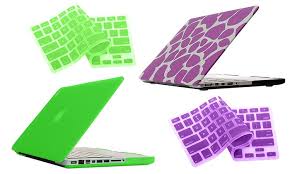
*Get a Bunta Frosted Macbook Hard-Case Shell with a Silicone Keyboard Cover for $19.99 from Groupon. Because they funky AND protecty. Gotta love that.


bunta


* Best Buy have Beats Mixr On-Ear Headphones on sale for $199.99 down from $249.99 plus free shipping. Get an extra $100 off with an .Edu email student discount. 


beats


*Get a Foscam FI8910W Wireless Camera with Optional 9dBi Antenna for $54.99 from Groupon. Unsure what you would use it for? We use ours to spy on our Guinea pig. So you could do that. (Not on our Guinea Pig, you weirdo)


camera


*Get $10 Off $80, $12 Off $99 or $15 Off $120 Coupon for Brookstone online with coupon code AFF625. Expires: 11-30-14


*12-Month Xbox Live Gold Card for $49.99 From Groupon.

 xbox


* Get $15 Off $75 at HP online with coupon code 15HPSAVE. Expires: 11-05-14


* Got an old car? We’re so cool with that, because old cars are gangsta, duh. But sometimes they need gadgets to bring them up to date. Get an A.M.P. Bluetooth Receiver for $18.99 from Groupon.


amp


Aaaaaaaand we’re dealed right out. Happy shopping, campers.


App Of The Week! Party Edition!

ffff


Just in time for the Saturday night, we have our App of the week. Were you guys thinking that this weekend was the perfect weekend for doing an Hour of Power? Yeah?


Excellent.


For those who are unsure of what an Hour of Power (Power Hour) is, excellent. It’s one shot of beer every minute for an hour and it looks like you’ve just found your Saturday evening activity. (Or Sunday morning – look at you!)


You’ll need Ali Spagnola’s Power Album: Party Hour Playlist Maker. It uses your own music, cutting the songs down to 1 minute each and giving you the option to add sound effects for when you have to drink.


It will also connect you to others doing exactly the same thing as you are (for Cyber Power Hour High Five’s obviously), tweet out your power hour party photos, and give you access to Ali Spagnola’s own personal power hour mix.


It’s $1.99 from the App store. Worth it. Happy weekend!


Not feeling U2’s ‘Songs of innocence’? Read this.

1409219519_Information


At Apple’s special media event last week, CEO Tim Cook was joined on stage by the band U2 playing a song form their new album, ‘Songs of Innocence’. Tim Cook then announced that as a special gift, all 500 million iTunes users would have the album- for free – automatically in their iTunes account.


Sweet, right?


Well, not if you’re not a U2 fan. Their has been a quite surprising amount of backlash to the gift, and nice guy Apple has therefore given us a way out.


U2’s manager  Guy Oseary told Mashable.”We just want to share it with as many people as possible. If you don’t want it and you don’t need it, delete it.” On Sept. 15, Apple set up an official page to help people do exactly that.


This is the support page you want, and below are the directions.


1) To remove the album:  Go to http://itunes.com/soi-remove.

2) Click Remove Album to confirm you’d like to remove the album from your account.

3) Sign in with the Apple ID and password you use to buy from the iTunes Store. You’ll see a confirmation message that the album has been removed from your account.


If you downloaded the songs to iTunes on your Mac or PC or to the Music app on your iPhone, iPad, or iPod touch, you’ll need to delete them manually. After you’ve deleted the album, you won’t be able to redownload it and will have to purchase the album when it is available after October 13th.


Now for some good ol’ Tuesday afternoon U2 comedy;


Why did Bono fall off the stage?  He was too close to The Edge!


Budum pshhh!


Q: What kind of lawyers praise U2? Pro Bono lawyers!


and finally:


At a recent U2 concert, Bono asked the audience for total quiet.

Then, in the silence, he started to slowly clap his hands, once every few seconds. Holding the audience in total silence, he said into the microphone, “Every time I clap my hands, a child in Africa dies.”

From the front of the crowd a voice with a broad Scottish accent pierced the quiet …

“Well, f**kin stop doin’ it then, ya evil ba*tard!”


We’re here all week!


The Apple Watch

applewatdh


It’s FINALLY here! ONE MORE THING! This morning the iWatch Apple Watch was revealed and we have all the beautiful wearable tech details for you!


Firstly – how to solve a problem like no-one wants to wear the same watch? Make a bunch of watches, dummy. And that’s what Apple has done with the Apple Watch. It’s the most highly customizable technology Apple has ever made.


As well as 6 different (and interchangeable) strap options and what seems to be a bazillion types of changeable displays, the Apple Watch comes in 2 sizes (dimensions not specified yet), and 3 models: The Apple Watch, The Apple Watch Sport and the Apple Watch Edition. Respectively it goes: Stainless Steel; Aluminum casing, and 18-karat gold.


You will need an iPhone to have the Apple Watch. We mean, you can probably have one without owning an iPhone, but it wouldn’t do much. At all. You need an iPhone for the Apple Watch to work. BUT the excellent news is that it will work with any iPhone from the iPhone 5 and up. Bajinga.


The fancy innovation that we knew was coming with the watch is in the crown, or, we should say, the digital crown. The twisty knob that normally sits on the side of watches is instrumental in the user interface of the Apple Watch, becoming a zoom, scroll and home button all in one.


There is a button below the digital crown that, when pressed, calls up your favorite contacts and lets you call, message or contact them via the Apple Watch’s ‘new form of communication’. This includes sending your heartbeat to someone, sending customizable emoji’s, your own doodles and drawings, and sending taps. Time to learn morse code?


Raise your wrist and the watch face display disappears and in its place is your recognizable navigation home page, with all your apps. You can move in and out to see more or less of the apps, and touch to go into them.


A really cool feature we liked a lot was in the messages app. If you receive a message and wish to reply, you can either dictate the reply and the device will send it via type or audio to the recipient, or it will give you a list of replies created from analysis of the original message.


The given example was a message with a question regarding song choice for Karaoke, giving two options. Those two options were included in the possible replies the device gave. Our lives are slowly turning into a one-button lifestyle! We think we like it…


Exciting feature number 2: Apple Watch has Siri! It will be interesting how close you have to hold the watch to talk to Siri, as in the demo Kevin Lynch was leaning quite close to the demo watch.


Apple Watch can tell the difference between a touch and a press which allows easier movement around the user interface and includes a feature called Taptic feedback – which means if you get a notification, a direction on maps, or a special message – it doesn’t vibrate, it taps to you, so only you feel it. Each direction on maps has a different ‘tap’. James Bond much. We foresee magical blindfolded missions with our Apple Watches! Is that just us?


You can keep your photos on the device, which is pretty sweet, and any photo you favorite in iPhoto or on your iPhone will automatically appear on the Apple Watch.


4 sapphire lenses on the back of the watch detect pulse rate and the combination of a gyroscope, accelerometer, Wi-Fi and GPS creates a comprehensive picture of your daily activity. We’re talking tracking standing and running and walking and heart rate and we’re all going to be healthy. Or feel bad about ourselves about all the not being healthy we’re doing.


To charge, although not specifically mentioned, it seems like the Apple Watch might need nightly charging, but it does charge with a specifically designed, snug little MagSafe charger, so no complicated new cables or awkward positioning needed.


Apple is giving the Apple Watch over to developers for the rest of the year, looking forward to the added capabilities they can give the Apple Watch. New applications mentioned by Tim Cook that will for sure be included are for the Starwood Hotel chain, the ability to check in and unlock your hotel room door with the watch, the ability to check into your American Airlines flights, the ability to control lighting and temperature in your home, MLB sports updates, the ability to control Apple TV, the ability to use the watch as a viewfinder for your iPhone camera AND walkie talkie ability. Sweet 80’s ski-slope style.


Overall, the Apple Watch was what we expected and a little bit more- a bunch of extremely useful technologies with a focus on health and making life and communication easier, bundled up into one beautifully designed, highly customizable watch.


The watch will start at $349 and will be available early 2015.


Apple Pay


apple_pay_reader_660.0


Apple Pay is the new service introduced by Apple this morning, and although it’s something that people have been waiting for for quite some time, it’s pretty exciting that it’s finally here and seems to be worth the wait in terms of design and simplicity of use.


Apple Pay uses NFC (Near Field Communications) to make purchases securely and simply – by holding up your phone to an Apple Pay reader in a store to complete the transaction.


Added to the 220,000 merchants across the United States, Apple has gotten some of the biggest chains and brands to get on board the Apple Pay train – such as Macy’s, Bloomingdales, Wallgreens, Duane Reade, Staples, Subway, Macdonalds, Wholefoods, Disney and Sephora. And, the Apple retail stores. Duh.


So what does this mean for you? Well, Apple is hoping to replace your wallet and put your purchasing power directly in your phone, making it

easier and more secure to make payments.


You simply load Apple Pay with a credit card (and it will work with Amex, Visa, Mastercard and -so far- 6 of the biggest issuing banks along with a few more) from iTunes or by taking a picture of it with the phone’s camera.


Apple will automatically verify with your bank that you are the owner of the card, and then you can go ahead and make purchases. In store, you place the phone near a sensor with your finger on touch iD. Online, stores that will use Apple Pay such as Target, Groupon, Uber and the MLB store, will allow you to make the payments within their mobile apps.


So how is it more secure? It’s a combination of the Touch ID and a new chip called the ‘secure element’ which stores all payment information encrypted. Your card numbers are never actually stored within Apple Pay. With each transaction the only information that is shared with the merchant is a device only account number, a one time only payment number and a dynamic security card.


This means that if your iPhone is lost or stolen, you can use Find My iPhone to suspend all payments BUT you don’t have to cancel the card.


We’re looking forward to this catching on. It’s great forward thinking technology. There will assuredly be some hiccups down the line, but, there’s still hiccups (pretty major ones, Hi Target) with the current credit card system, and that’s some 50 years old. Time to move on, we thinks.


So, hey.. Developers? We were wondering how long it will be until Apple Pay includes Bitcoin?


Apple Pay will launch in October and will be a free update in iOS 8. 


App of the Day! Whiskey edition.

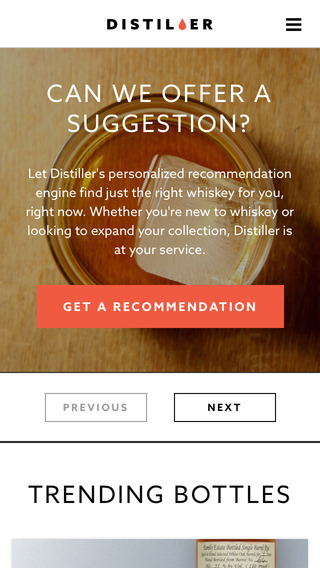
If you’re a whiskey fan (and you probably should be), you will love our App of the day today! It’s called Distiller. It’s all about whiskey! And it caters for Scotch, American, Irish and other Whiskeys. Num.


It’s a most wonderful App that not only has a really fun and simple user interface, but also buckets of features.


distiller


You can use the App to search for new whiskies, follow and communicate with other whiskey lovers, read and write customer reviews and see what the experts have to say (though aren’t we all experts, really?), follow their whiskey blog ‘The Mash Bill’, see trending whiskies, and even have personal Whiskey recommendations based on personalized questions, whether it be for a gift, or something new to try.


Get it for FREE from the App store. You must enter your birthdate and country before entering the App at first so that they know you’re legal, as well as agreeing to the terms and conditions.  So, Happy Weekend Whiskey Lovers! We were recommended to try Bowmore 12 pleated single Malt, so we think our weekend looks to be turning out rather sweet and rich.


Scotchy scotch scotch to you!


What to expect from the iWatch?

iWatch mock up photo by Brett Jordan Via www.adr-studio.it/site/?p=269 is licensed under CC BY-SA 2.0


The much anticipated iWatch is said to be revealed alongside the two models of the new iPhone 6 this coming September 9th, which is in 4 days, 19 hours, 40 minutes, but who’s counting? We’re very, very excited.


But why should we be excited? What should we expect from the iWatch?


Check out our earlier article alongside this one to see who Apple have hired purportedly for the creation of the iWatch, and what that might mean for the technological features we can expect.


The iWatch will most likely have a range of health related capabilities from fitness tracking to sleep recording, heart monitoring and medication monitoring, among many others. There are reports that alongside the iPhone 6, the iWatch will also have NFC support allowing for mobile payments.


The watch is likely be able to be used as a standalone device but will be best used alongside and in coordination with an iPhone. There is a good chance that the iWatch will have a curved and flexible screen and… drumroll please… wireless charging. We certainly hope that rumor is true, because that would be, um, amazing.


We should expect a price point of around $400, but that’s a fairly wide shot in the dark at this stage. In fact, some reports are coming in that the price may not even be mentioned on September 9th when the iWatch is announced, as it won’t have been finalized yet. Further reports speculate that there will be a range of pricing based on differing model features.


Most of the people with secret sauces are saying that we, unfortunately, won’t see the iWatch shipped until early 2015. We still have a sliver of hope that we could see it in time for Christmas, but the chances are looking  a little slim.


This is the first time in a while that Apple has released a completely new product, and it feels like it’s going to be a really nice, really useful tech device. AND REALLY BRAND SPANKING INNOVATION – Y ! YEAH!


We’re excited. If you couldn’t tell.


iWatch mock up photo by Brett Jordan Via www.adr-studio.it/site/?p=269 is licensed under CC BY-SA 2.0

Celebrity nude photo hacks being investigated by Apple.

overview_icon


Unless you’re living under a rock, or some other no-media penetrated secluded villa in the south of France, you will have heard about the hundreds of photos leaked onto the internet. Naked photos, specifically, of celebrities purportedly taken from their iCloud accounts and posted on the dark website Tor, before landing on 4Chan and leaking alll over the internet, as something as viral as naked celebrity photos was always destined to do.


Some of the celebrities involved have claimed that the photos are fake, whilst others have been confirmed to be legitimate.


Bad news.


Apple gave a statement to the guys over at Re/code advising that they will be undertaking a full investigation into the matter, which is great. “We take user privacy very seriously and are actively investigating this report,” said Apple spokeswoman Natalie Kerris.


Apple has since today come out with confirmation that the iCloud feature was not breached, instead the hackers were able to access and steal the photos using a targeted attack on user names, passwords and security questions.


From the sauce:


“We wanted to provide an update to our investigation into the theft of photos of certain celebrities. When we learned of the theft, we were outraged and immediately mobilized Apple’s engineers to discover the source. Our customers’ privacy and security are of utmost importance to us. After more than 40 hours of investigation, we have discovered that certain celebrity accounts were compromised by a very targeted attack on user names, passwords and security questions, a practice that has become all too common on the Internet. None of the cases we have investigated has resulted from any breach in any of Apple’s systems including iCloud(R) or Find my iPhone. We are continuing to work with law enforcement to help identify the criminals involved.”


This validates what security experts suggested yesterday – that the hackers were able to get ahold of the photos because of a combination of weak passwords and the lack of two-step verification. Two-step verification is a feature Apple introduced in March last year which requires a security code and a trusted device to log into your iCloud account as well as a password.


Although originally suspected of being used in the hack, it appears that a tool shared a few days ago on Github, a code-sharing website, was not used by the Hackers. This tool would have allowed hackers to repeatedly guess passwords without being locked out of an iCloud or Apple account but was fixed by Apple as of Monday morning. Attempting to use the tool now locks an Apple ID after five attempts to guess a password.


As always, if you’re concerned about your privacy we recommend using strong passwords and making use of the two-step verification.  


Strong passwords will include numbers, symbols and a mixture of capitals and lower case letters, and will not create a word or sequence of numbers that can be related to any of your biographical information by anyone but yourself.


To find out more about how to set up two-step verification, visit the Apple support page here. 


Image courtesy of Apple.

Changes in California smartphone laws

A new law, State Sen. Mark Leno’s Smartphone Theft Prevention Act (Senate Bill 962), was signed into California law on Monday indicating a change that will hopefully prevent the massive amounts of cell-phone theft that has been plaguing the state.


After July 1st, 2015, every smartphone sold in in California must by law be equipped with default theft deterrent technology that will render the phone useless to the thief if stolen, eradicating the incentive to steal smartphones almost completely (unless said thief knows a super great place to sell smartphone parts) as well as the violence that comes along with such robberies.


The law dictates that every smartphone sold in California (online or in store) no matter where it was manufactured, must come with a default kill switch that when activated, will remotely turn off the phone and erase it’s contents, being able to withstand a hard reset or operating system downgrade, henceforth making it useless. There must also be the ability to turn it back on by the owner of the phone if the phone was found to be misplaced instead of stolen.


Authorized users also will have the opportunity  to opt out and turn the kill switch feature off, which, just like the iCloud lock, you will have to remember to do if you are selling or giving your smartphone away!


So, good news? Well, we think it’s awesome news that people are trying and succeeding in changing technology laws in an effort to enhance public safety, certainly. But will this effort decrease the amount of robberies in California? We can only hope, and wait and see.


App of the day!

ignore


One of the biggest pet peeves in life has only existed since we started carrying around those little computers in our pockets. Twenty years ago, if you tried to contact someone, you would knock on their door, write them a letter or ring them on their landline. If there was no answer to any of those things, you would assume that they were somewhere else at that moment, or that your reply letter was in the mail.


Simple.


Now, when you contact someone, you know there is a very, very good chance that they see that you’re contacting them. And if there is no reply, then there is a very good chance that they are ignoring you. Or busy, yes, but sometimes you just know that they’re ignoring you those heartless bastards.


And that is annoying.


Now, for better or worse, someone has created an app to change all of this. It has the potential to be kind of mean, but considering it was made specifically with children ignoring parents in mind, it’s pretty ingenious and comes from a best hearted kind of place.


A mom from Houston, Sharon Standifird worked with developers to create the app called ‘Ignore no more’. If a child is ignoring texts and/or calls from a parent, it gives the parents control over the child’s smartphone, shutting down their ability to do anything on the phone except call 911 and access a list of pre-approved contacts, which they must call  in order to receive the password to unlock their phone.


This of course could get a lil’ messy if it falls into the hands of the wrong people. We can think of a few people who could benefit from their phone shutting down when they ignore us…  Does that make us the wrong people? I think it does…


Ignore No More costs $1.99 and whilst currently only available for Androids, the iPhone version is in the works and will be released soon, so keep an eye out for it!