Category: Apps

APP OF THE WEEK!

There are so many good movies out right now! Can anyone say Super Summer of blockbusters? We LOVE that feeling of sitting in the dark movie theater with a bunch of friends or that special someone, suppin on a 44 oz Coke, munching on some delish corn, just about to watch some thrills and bangs…


BUT


That feeling only lasts as long as the coke does in your body. Wanna know when to go pee in a movie? We got you!


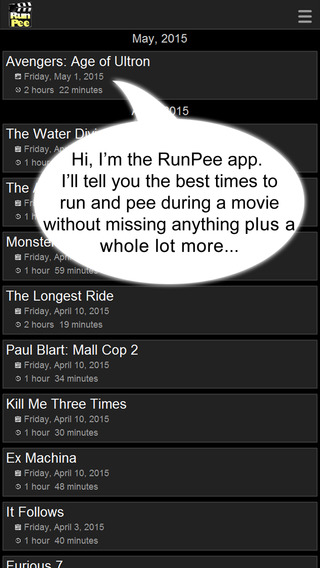
screen568x568


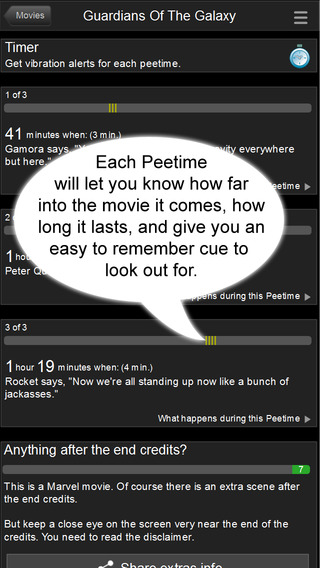
This app will save your blockbuster seein’ a**  this summer! It will tell you the best times to relieve yourself in any of the movies the day they’re released to theaters – and includes a rundown of the bits you missed whilst said relieving is being done!


screen568x568 (1)


Sweet. Download it here. It’s FREE!


Apple’s celebration of it’s App Store!

If you missed last week’s WWDC keynote, then you missed Apple’s self-congratulatory dialogue about the App Store and all of the life-changing Apps that exist within it. The App store has grown from 500 apps to well over a million in just 7 years, and, yes, we do love ourselves some apps. Life changing ones, procrastination ones, fun ones, sexy ones, educational ones, stupid ones…. we love apps. Apps, Apps, Apps.


Watch the video to see just how much we love Apps!


Watch the mock WWDC backstage video!

To celebrate WWDC and show what all-round-knock-about-funny guys they are, today Apple shared their mock “Backstage” video starring Bill Hader as WWDC’s director, doing a run through of a very different WWDC kickoff to the one we saw.


It’s funny. Watch it!


WWDC runs through the 12th, with developers just like the ones in the video learning all they can to develop the apps of the future!


Say hello to your new friend: iOS 9

ios9


iOS 9 will be coming at your phone this Fall, and with it comes an array of improvements designed to make your life better! Here’s what you need to know:


For the iPad exclusively, iOS 9 brings a function called Slide-over, which will let you open apps without leaving the one that you’re in,  a brand-new QuickType keyboard, and a picture-in-picture feature that allows you to watch video from another app while you do something else.


There’s also a multi-tasking function called ‘Split view’ which lets users use 2 apps at the same time, on the same screen. This is a yay moment for iPad users everywhere – except it’ll only be available on the iPad Air 2… Bummer. Kudos to you iPad Air 2 owners.


For both iPhones and iPads, we get a better looking and more helpful Siri, a brand new Search window, which offers commonly used apps or contacts, one-tap links to nearby locations and breaking news, and – finally- transit directions in Maps and integrated with Siri.


*Siri will now react to context, which is a little scary – offering to play music when headphones are plugged in, or searching email when an unknown phone number calls and displaying it if found.


*There’s a new ‘News’ app for reading news stories, sourced from (so far) ESPN, Politico, the New York Times, Conde Nast publications and local news.


*A new optional iCloud Drive app on iOS that will let users access files stored in iCloud Drive.


* Passbook has been renamed Wallet.


*Notes has a bunch of shiny updates and additions, including new formatting options,the ability to add links, maps, and photos directly into the app, checklists, and sketching tools.


* iOS 9 brings us the ability to browse through images quickly using the new scrubber for iOS Photos.


* Find My Friends and Find My iPhone are both default apps in iOS 9 and come installed automatically.


*When setting a Passcode in iOS 9, you’ll be required to enter six digits instead of four for increased security.


* Exciting video stuff! .With iOS 9 you’ll have way more options-  720p HD at 30 fps, 1080p HD at 30 fps and 1080p HD at 60 fps for standard video and 720p HD at 120 fps or 720p HD at 240 fps for Slo-mo.


* THIS ONE IS REALLY EXCITING TO US but may not be for others… with iOS 9 you’ll have the ability to add email attachments to messages in the Mail app, which sources documents from iCloud Drive. SWEET! BECAUSE WE LOVE ATTACHING THINGS TO MAIL.


*Extended battery life. 1 hour additional battery life for the iPhone 6, PLUS a Low Power mode that will extend battery life for 3 hours. The time it takes to download its latest software updates is reduced and AWESOMELY  and ABOUT TIMELY, downloading iOS 9 will only require 1.3 Gb of spare space on your device.


*In order to save battery power, if your iPhone is facedown on a table, it will not turn the screen on, even when a Notification is received.


To sum things up-  a pretty solid if unexciting update to the iPhone and iPad operating system. Sign up here if you’re interesting in testing out the public beta which will be available in July, however we’d recommend waiting until after the public release of the more stable version in the Fall.


iOS 9 will be available for iPhone 4S and up, as well as iPad Air 2 and iPad Mini 2/3.


Salute El Capitan! OS X 10.11

el capitan


After last year’s OS X Mavericks named after the beach break south of the Bay, Apple introduced us all today to OS X El Capitan, named, of course, after the stunning, big a** rock found in Yosemite.


El Capitan brings with it a few cool things that will probably make your life easier.


* Split view! Work in two apps at the same time on the same screen!


*Less exciting, but still useful – when you lose your curser, shake your finger back and forth on the trackpad or give your mouse a shake, and the cursor gets bigger so it’s easy to spot.
*A new pinned feature in Safari lets users keep websites listed at the top of the window, similar to a bookmarks bar. There will also be a mute feature that will function even with several tabs open.


* The Notes app gets the same updates as in iOS 9, with checklist ability, and ways to add a photo, video, URL, or map location to a note. All your notes are kept up to date across all your devices on the cloud.


* The new Mail app features enhancements to its full-screen mode, tabs in the compose window, the ability to hide in-progress messages and go back to the main Inbox. There are also new gestures built into Mail for archiving and deleting — simply swipe on the trackpad.


* The Photos app will come with support for third-party editing extensions and tools that will be available from the Mac App Store and accessible right in the Photos app.


* Spotlight search goes deeper into our souls with a higher level of understanding, contextually aware search results from a greater number of sources.


* Metal for Mac has arrived, with 50% improvements in rendering with 40% less CPU processing power required for graphics. Metal on OS X El Capitan offers better battery life and improved graphics performance for both games and professional apps. It will also make it up to 1.4 times faster to launch an app, up to 2 times faster to switch in-between apps, up to 2 times faster to display email addresses and up to 4 times faster to open a PDF in preview.


OS X 10.11 El Capitan is available to registered developers today. For the rest of us, it will be available in public beta in July and will publicly launch in the fall. For FREE! Yessir!


Watch OS 2

watch


The Apple Watch! Soon to be updated to SUPER APPLE WATCH! Or, in laymen’s terms, Apple Watch OS 2.


*The most exciting thing about this update in our minds is that with it, the Apple Watch will support native apps (meaning apps that don’t have to go through the iPhone first). Booyah.


*There will also be third-party ‘complications’, which means that you can change and add to the data you see on the clock face, as well as new apps that will have access to the Taptic engine, microphone, accelerometer and heart rate sensor as well as the crown.


*The Watch will naturally be benefited by the device-wide Siri improvements, Apple pay updates as well as the transit directions in Maps.


*The Watch will be able to play videos as well as – very exciting- the ability to make FaceTime Audio calls.


* The Watch will also have a bunch of different Watch faces to choose from, including iconic locations around the world shot over 24 hours and the user’s own photo albums. When you select an album, every time you raise your wrist a different photo form the album will show.


* Users will be able to add more than 12 friends and have the ability to send sketches in multiple colors.


* The Apple Watch will, with OS 2, come with Activation Lock which, as in iPhones, will prevent another user from wiping or activating the Apple Watch if it is lost or stolen.


WatchOS 2  will be available to the public in the fall alongside iOS 9 and will be FREE.


Apple Music & Beats 1 Live Radio Station.

Apple-Music-iOS-9


Apple Music is here! Well, not yet, but all the information about it is!


Come June 30 users will be able to use it to  stream songs, access curated playlists, and tune in to a 24-hour, live worldwide radio station called Beats 1.


Apple Music can be split up into 3 different facets that Apple hopes everyone will use and enjoy (D’uh), as well as making the music world a fairer and more creative place to be.


First, there’s the streaming service. Your own collection of music, as well as tens of millions of tracks in the Apple Music library. Handpicked by a ‘dedicated team of experts’ just for you, (not too sure yet on the logistics of this) and a bona fide way to discover new music.


Unlike some of their biggest competitors like Pandora and Spotify who use Algorithms to select songs in their product, Apple Music will have human curation, which, in Jimmy Iovine’s words,


“Algorithms alone can’t do that emotional task,” argued Iovine. “You need a human touch.”


Next, there’s the radio station – Beats 1.  24/7 radio broadcast to over 10 countries, and headlined by former BBC radio DJ Zane Lowe alongside other famous DJs from Los Angeles, New York and London such as Ebro Darden and Julie Adenuga. Beats 1 will offer exclusive interviews, guest hosts and other music world gossip and goings-on.


Third, we have Apple Music Connect, a social platform for Artists ( both known and as-yet-unknown) to interact with listeners and fans, with extra multimedia offerings such as lyrics, videos, photos etc.


So what do we think? Looks like a pretty solid service with a likely very big boost from grandfathered in Apple customers and the offer of a 3 month free trial. It will work, and it will be a strong and exciting competitor. It will add to the way that we listen to music. Even so, Pandora already has 80 million users, Spotify 60 million – so even with the boost, Apple might have a fight to the top.


Apple Music will be available for iPhone, iPad, Mac and PC on June 30, with support for Apple TV and Android coming in the fall. For full membership, you’re looking at a monthly fee of $9.99 or $14.99 for a family plan for up to 6 family members, although there will be a 3 month free trial available for all.


If you’re not down for commitment, you can still listen to Beats 1 radio, see what artists are posting on Connect, and hear ad‑supported stations on Apple Music (with limited skips) without a membership.


Check out the Ad for Apple Music here for the ‘feel good about the world with Apple’ feeling!


Hungry? Tweet some pizza to your door!

goodpizza


Having a party? Got the Friday night Munchies? You know what is awesome for both of these? Uh, PIZZA. Cheesy, saucy, delicious pizza. YO you should probably order some pizza!


Wait, what’s that? You’ve lost your voice? Your computer will only let you type certain keys? UH OH.


That’s ok though, bro! Come May 20th, Dominos will be accepting pizza orders through Twitter. All you have to do is tweet 🍕 @Dominos.

THAT’S ALL YOU HAVE TO DO! After you create a pizza profile, and add their Twitter handle and favorite pizza. BUT AFTER THAT THAT’S AL YOU HAVE TO DO! Bro!


So….Pizza party May 20th guys?


Tech of the Week!

20141029074026-Main_Curled


Are you one of those people who are always losing things? We get it, yo! That’s why we have some new tech to tell you allll about that will help you NOT lose one of your most important possessions – you wallet.


Give a warm welcome to our Tech of the Week –  The SmartWallet.  This thing? Sounds awesome.


The SmartWallet (above, in all it’s aesthetically pleasing glory) is a wallet that not only carries important things like cash and credit cards, but it also has a built-in 1000 mAh backup battery so you can charge your phone for up to 4 hours on the go.


BUT that’s not all, the main use of the SmartWallet is to make sure you don’t freakin’ lose the thing (and the important things inside). It does this by using GPS. If you lose it within a 50-150 foot radius, use the associated app on your phone and it’ll show you exactly where it is and how to get there.


If the Wallet has been lost outside of that radius, it’ll show you the GPS location the Wallet was last in. Before that happens though, as soon as your wallet goes out of that range, your phone will notify you.


AND if you’ve lost your phone, not your wallet, pressing a button on the wallet will make your phone ring – whether it’s on silent/vibrate, or not.


The wallet was a successful Indiegogo project, and it will retail for $116 USD, so if you’re a loser (of things),  keep an eye out for this one !


How to set up and use your Apple Watch!


apple watch


Did you get a shiny new Apple Watch today?  HERE’S HOW TO USE IT!!


First things first: Make sure you have an iPhone 5, 5s, 5c, 6, or 6 Plus running iOS 8.2.


Secondly things secondly: Your watch should come with about 50% charge, but charge your watch if it needs it.


Power on the Watch by pressing the side button, and follow the prompts to select a language etc. Launch the Apple Watch App on your iPhone (it was automatically installed when you updated to iOS 8.2) and Tap “Start Pairing” on the main screen. Hold your watch up to your iPhone’s camera so the screen is aligned with the yellow outlined box on your iPhone’s screen, and follow the instructions on your iPhone screen.


If you open the Settings App on your shiny new watch, you’ll find the options to customize your brightness, sound, text size, silencing ability, and Do Not Disturb functions.


IMG_6730


Your new best friend is the Digital Crown. Tap it to get back to the home screen, use it to zoom in maps/photos, press it in conjunction with the side button to take a screen shot, press and hold to activate Siri, and double click it to jump to your most recently visited app.


Your second best friend forever is the SWIPE! YES! Swipe up from the watch face to see what Apple calls ‘Glances’ which contains information such as calendar events, weather, heart rate, location, and the ability to access the option to ‘Ping’ your misplaced phone.


Swipe down to see your notifications. Swipe left on a notification to quickly clear it. Check your heartbeat by swiping up to expand Glances and swiping left to the heartbeat card.


Tapping is the cool guy you thought you knew that has a surprise twin brother that seems pretty cool. The Watch is pressure sensitive, so light tapping will have a different effect than if you ‘force touch’ – a slightly longer, firm press.


There are a number of uses for the force touch that become more apparent the more you play with the device. For instance in the maps app, you force touch to get to the search feature. Force touch the watch face to change its design, or on the notifications ‘red dot’ to clear them all, or on the Messages inbox to compose a new text.


IMG_6727


In Glances, tap to get more information on any of the applications.


Raising your hand will activate the display and show you the time, the last notification if you’ve received one, or activate Siri if you say “Hey Siri” at the same time. Lowering your wrist after receiving a notification will dismiss it. Putting your hand over the watch face will silence an incoming phone call.


You can also use it to control Apple TV, which could be useful, and also could be super annoying to anyone else in the room (which, yes, can be excellent).


To use Apple Pay, double click the side button and hold the face of the watch near the card reader. POOF, MONEY EXCHANGED!


We’ll be bringing you more Apple Watch updates and user guides as we get to know more about the device, and in the mean time, you should also check out the Apple video guides here.


Happy Weekend Kids!