Posts tagged: Apple

OS X Mavericks – What you need to know.


We would have suggested OS X Liger (rawr!), but Apple went ahead without consulting us, starting over with the naming process for system upgrades and leaving the big cat names behind.


Announced back in June at WWDC and coinciding with their new ‘Designed by Apple in California’ ads and the announcement that the Mac Pro will be built solely in America, Apple started a new naming scheme for their operating system based on locations in California.


Mavericks is a surfing location particularly well known for its dangerous big wave riding in Northern California, just north of the town of Half Moon Bay.


Now, it’s also the new Apple operating system. Is it as cool as beach with big wave breaks? Well, kinda? We may have trapped ourselves in that comparison- it might not be that cool, but it is very cool.


Here’s the double rainbow of coolness for you guys;


New Finder Tabs.


Just like in your Internet browser, you can now have independently controlled tabs in your finder windows. You can merge these finder windows and take the finder full screen.


Tagging.


Filed under ‘I wouldn’t have though of this, but now that you did, it looks really freakin useful’ is tagging.


With Mavericks you will be able to ‘tag’ documents and media – save it, tag it as sports, home, to do, etc. and it catalogues these under their tags in the side bar of the finder.


You can tag documents with multiple tags, create new tags on the go, and the best part? Searching using tags. For instance, searching for ‘iphone stuff’ and ‘the best’ will naturally take you directly to your saved iPhone Antidote Wallpaper.


Multiple Displays


Users will now be able to access the menu bar and dock separately on each screen with multiple display support. You will also be able to load separate and independent applications on each screen, and drag them from screen to screen.


Apple TV is not forgotten here either, as it can now be a fully powered OS X display, with access to menu bar dock and independent applications also.


Extended Battery Life


There is a heap of new processing elements included in Mavericks to extend your battery life and reduce CPU utilization by up to 72%.


We particularly like a new feature called app nap, which figures out what applications and web pages are in use, and which are not. The system will then simply stop giving power to the web pages and applications that you’re not currently looking at.


Compressed memory pretty much does what it says, compressing inactive memory to provide spare memory to running applications when needed.


Timer Coalescing groups low end operations together , creating tiny periods of time when your computer can enter into an idle, low power state, which in turn saves your battery.


Safari


Safari is updated with Mavericks, starting with an all-new homepage with top sites and a sidebar with your bookmarks and access to your reading list. This will also include shared links from people you follow on Linkdin and Twitter.


Safari uses less energy in this update and includes accelerated, smoother scrolling and one click bookmarking.  In your readin list, you will be able to scroll continuously through all of your articles, one after the other.


iCloud keychain


Cross device safe keeping of all your passwords and credit card information starts with iCloud Keychain.


This new feature will store all your passwords, across all your devices, so you don’t have to think about them ever again. Sounds pretty good right? The keychain will even suggest new passwords for you, and then will go ahead and put it in the cloud, encrypted.


With your credit card information, when shopping online, the keychain will offer the last four digits of all the cards you have stored, and you can pick one when paying and be done with it.


Although this sends little tiny shivers of scariness up the security part of our spine, it also sounds super useful and convenient.


Notifications


You can now get all your notifications, from all your devices, on your computer.


What’s also pretty great about this is you will have a number of new options for action within the notification when it appears on your screen.


You can respond directly to most notifications, (by replying to email, declining Skype calls etc.), within the notification banner when it appears.


Once you have actioned a notification, you won’t see it again on any of your other devices, and they will all be updated with your response to the original notification.


When the computer is awoken from sleep, all the alerts you may have gotten when it (and you!) were asleep will be listed.


Calendar


The calendar app has been updated in a really cool way- where now if you have appointments scheduled, the app will give you a ton of information you might need for them.


The calendar will now provide you with weather in the spot where your appointment is scheduled, as well as suggestions for restaurants etc if you require them.


We particularly like that the calendar will work out and tell you the travel time to and from your appointment, and will even add it to the calendar so you cant double book the time when you’re supposed to be on your way!


You will also get notifications of when you need to leave on your phone and/or computer.


Maps


Maps hits the computer with Mavericks! You can now access street maps, 3D flyover data and info cards. You can also push turn-by-turn directions to our iOS device straight from your computer.


iBooks


iBooks will be on your computer by Fall with this system update. Now you can access all the books in the iTunes store as well as your stored books and bookmarks, and read them full screen on your computer screen.


But what is really cool is for the educators and the learners amongst us.


iBooks for Mavericks will come with interactive textbooks, which feature videos and other media embedded within the normal text. You will also have the ability to highlight and make notes, and learn using study cards made from the material.


Sounds pretty awesome huh?


OS X Mavericks is available RIGHT NOW for FREE in the Mac App store.  Download it here now.


All images courtesy of Apple.

iPad mini with Retina Display


Along with the iPad Air, Apple also gave us a shiny new iPad Mini. With Retina display. Yeah, we all knew this was coming, but it’s still awesome. Because Retina is Awesome. D’uh.


The new Mini has the same 7.9-inch display BUT with the retina display the screen now has four times the pixels, with a full 2048 x 1536 resolution.


It’s ever so slightly heavier and thicker to compensate, but the good guys out there who have held it say that it’s not really noticeable.


The other extra on the upgraded iPad Mini? It also comes with the new A7 chip seen in the iPhone 5S. The super fast & super powerful 64-bit A7 processor makes scrolling and everything else notably faster and smoother.


The Mini with Retina comes with an improved 5-megapixel camera and the front FaceTime camera comes in HD with larger pixels to help in low light, and duel microphones. It also comes with Multiple-input and Multiple-output tech that gives the device faster Wi-Fi capabilities. It maintains it’s 10 hour battery life.


HOW MUCH??


The Fancy Retina Screen comes at a price, beginning at $399. BUT it is now being offered at 16Gb, 32Gb, 64Gb AND 128Gb.


iPad Mini with Retina Display with Wi-Fi – $399 for the 16GB model, $499 for the 32GB model, $599 for the 64GB model and $699 for the 128GB model.


iPad Mini with Retina Display with Wi-Fi + Cellular – $529 for the 16GB model, $629 for the 32GB model, $729 for the 64GB model and $829 for the 128GB model.


You can still get the original iPad Mini at  LOWER price, with the 16Gb starting at $299 for Wi-Fi and $429 for Wi-Fi + Cellular.


They will be available in Space Grey and Silver.


WHEN?


It will be at some point in November.


Also: There are expert analysts who say that the iPad mini with Retina Display will be really hard to get your hands on until early next year (These guys don’t really have a lot to do with Apple themselves, except that they study them and have secret sources and stuff).


So, if you’re planning on getting one as a Christmas Present, you better get your best Christmas Present Getting Boots on early, and on well!


Images courtesy of Apple, TodayIFoundOut, KnowYourMeme & Cactuscreekdaily.com

HTC releases a phone with a fingerprint sensor


onemax


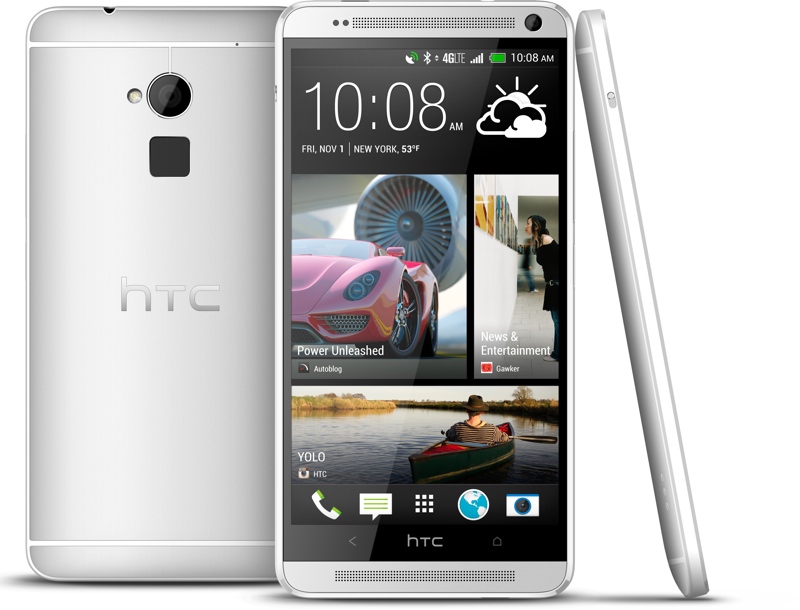
HTC have released a new smart phone, and it’s the second one in recent history to have a fingerprint Sensor. The first, of course, was featured on the home button of the iPhone 5S, and it was called the Touch ID.


HTC ‘s new phone is called the HTC One Max and the fingerprint sensor is located on the back of the device, near the camera lens.


You activate the sensor by swiping it and while it can only recognize 3 different fingers, each finger can be linked to different functions, i.e. unlocking the phone or opening the camera.


Unfortunately, the positioning of the sensor, the fact that you need to wake the phone from sleep before using it and no doubt it following so quickly in the footsteps of the highly viewed Touch ID means the reviews of the HTC Max One inclusion of a fingerprint sensor is coming under some quite loud criticism.


For example, we have this from The Verge


“The fingerprint scanner implementation here is clumsy, awkward, and comfortably in line with the long history of failed attempts at making this technology work.”


This From Cnet:


“A big part of the frustration is that you can’t really see or feel the scanner to position your finger on it properly. Equally, it’s not obvious how the thing works — it doesn’t technically “scan” an image of your fingerprint, but instead measures the capacitance of your skin to create a unique signature. ”


And, lastly, this from Engadget:


“Overall, the fingerprint scanner could work better; it’s not quite as intuitive as Apple’s Touch ID, and we’d happily have given it up in exchange for something more useful, like optical stabilization in the camera module.”


Hmm.


Other than the Fingerprint sensor, the phone is said to be, well, eh. Eh-y. It has a huge screen at 5.9 inches diagonally, but doesn’t have the fastest Snapdragon 800 processor.  The thickness of the device and the camera are also not as great as expected.


If you think about it, it’s a wonderful thing for people to have great expectations for your company’s products, as many people do for HTC. Missing the mark one time? Not so bad. But we might wait for the next HTC phone.


Think it’s for you? The HTC Mac one will be available on Sprint and Verizon later in October.


( P.S. When you get it, sell us your stinky iPhone for CashMoney, make the world dance )


Image courtesy of MacrumorsTechradar & Sodahead.

Apple hires burberry lady


Apple has hired the second fashionista in months and this time it’s a nice lady from Burberry.


Burberry, for those less in the fashiony know, is a british luxury fashion house. They’re fancy and most well known for this:


The trench coat, not the celebrities. Although a lot of celebrities like wearing Burberry. Cos it’s fancy.


The CEO of this fancy fashion house has just been announced as the Senior Vice President of Retail and Online Stores for Apple. She will be in charge of the strategic direction, expansion and operation of both Apple retail and online stores.


According to Tim Cook:


“I am thrilled that Angela will be joining our team, she shares our values and our focus on innovation, and she places the same strong emphasis as we do on the customer experience.


She has shown herself to be an extraordinary leader throughout her career and has a proven track record.”


This is the lovely burberry lady in question. She will start her role in the Spring, and will be at Burberry until then.


She looks pretty cool, huh. She’s got a pretty good record in the fashion industry, so it looks like a pretty nice hire, and no one is leaving Apple’s executive team.


The lady herself has said that she’s “profoundly honored to join Apple in this newly created position next year,” and that she’s looking forward to “working with the global teams to further enrich the consumer experience on and offline.”


( That’s us, yay.)


Recent fashion-y hires by Apple include Paul Deneveformer as vice president in charge of special projects in July of this year. He was previously CEO and President of Yves-Saint Laurent, another fancy fashion house. In August Apple hired Enrique Atienza, a senior vice president at Levi’s to lead Apple’s US retail efforts.


Definitely seems like Apple is hiring on… trend….


Images courtesy of fr.wikipedia.org, thetimes.co.uk & fashionableyours.ca

iOS 7 is the besterest


iOS 7 is getting kudos and awesomeness from all kinds of places! Heck yes!


The guys over at Pfeiffer Consulting have released the results from their yearly Mobile OS User Experience Benchmarks (which smartphone is the besterest to use).


And guess what? Oh… yeah, it’s in the title.


iOS 7 was found to be the best user experience, scoring a total of just over 73%, with the closest competitor being iOS 6 on 60% and 57.25% for Android.


When conducting the study the company looks at the following:


*Cognitive Load

*Efficiency

*Customization

*User experience Friction


See all the scores below! Also, check out the full report here.


What do you guys think?


For realz, this is gotta make Apple feel like this…


Images courtesy of  9to5maccbc.ca & sfgate.com

Apple crediting iWork & iLife purchases!


Did you purchase a new iOS device after September 1st, but just before Tim Cook announced that all new iOS devices purchased would come with iWork and iLife apps for free?


Did you buy apps from iLife or iWork and then kicked an Apple voodoo doll cos you felt ripped off?


Were you perhaps confused about it all and bought the apps anyway not thinking they were actually going to be given out for free?


GOOD NEWS!


Apple have begun to send out emails to eligible users that did any of the above letting them know not to worry kiddies, their iTunes accounts will be credited for the money they spent on the apps that were supposed to be free!


If you think that you should have received an email and you haven’t yet, you get right on that phone and call Apple! 800-275-2273


Here’s the official email from  Apple.


Dear iTunes Customer,


On September 10, 2013, Apple announced that iPhoto, iMovie, Keynote, Pages, and Numbers iOS apps are now available as a free download on the App Store for qualifying iOS 7 compatible devices activated on or after September 1, 2013.


Our records indicate that you purchased one or more of these apps on or after September 1, 2013 so we have provided you with the iTunes code below in the amount of $5.34.


This credit can be used towards the purchase of any content on the iTunes Store, App Store, or iBooks Store. Detailed instructions for redeeming the code can be found at http://support.apple.com/kb/ht1574.


Code: [redacted]


Thank you and we hope you enjoy using this credit towards your next purchase on iTunes.


Regards, iTunes Customer Support


For full iTunes Terms and Conditions click here:http://www.apple.com/legal/itunes/ww/


Apple courtesy of Macrumors. Image courtesy of Appleinsider.

National Geographic Photographer lurves the iPhone 5s


National Geographic photographer Jim Richardson went to Scotland ( lucky, cos Haggis and Irish whiskey is awwwwesome) and he took his iPhone 5S.


Uh…and?


AND he took a bunch of photos and said that the camera on the 5S is really, really sahweet. We may be paraphrasing.


He said this exactly:


“With intense use (I’ve made about 4,000 pictures in the last four days) I’ve discovered that the iPhone 5S is a very capable camera. The color and exposures are amazingly good, the HDR exposure feature does a stunningly good job in touch situations, the panorama feature is nothing short of amazing—seeing a panorama sweeping across the screen in real time is just intoxicating. Best of all it shoots square pictures natively, a real plus for me since I wanted to shoot for Instagram posting.


Once I figured out what the camera could do well I began to forget all the things it couldn’t do at all.
While the iPhone 5s still uses an 8-megapixel camera, it utilizes a sensor that has a 15 percent larger surface area, which means it will produce higher quality photos in low-light conditions. It also has a 5-element lens with an aperture of f/2.2, an improvement over the iPhone 5’s f/2.4 aperture and the pixels are larger, at 1.5 microns, for better light absorption. All in all, the iPhone 5s has a 33 percent increase in light sensitivity.”


Have you got an iPhone 5S? How are you finding the camera?


Check out Jim Richardson’s blog post on National Geographic here, or follow him on Twitter @jimrichardsonng


Image courtesy of Appleinsider.

Deal of the day!


This is an awesome deal.


AT&T are offering the OtterBox Pursuit Series Waterproof Box in small or medium at a knockout price!


Instead of $25 for a small or $40 for a medium, you can now get 3 for $11 or 1 for $5 PLUS FREE Shipping.


Whaaaaaa!


Yup. Go here and here! Do it!


Beware, we’re not sure how long this deal is going to be around, and there have been rumors of some people’s orders being cancelled. So cross your fingers and hope for a pretty, cheap as chips Otterbox on it’s way to your house!


High five!!


Images courtesy of Att.com & Grandfather.com

Who wants to win a shiny Gold 5S? Anyone?


GUYS GUYS GUYS


Wanna win a brand new shiny iPhone 5S? In GOLD?


UH… D’UH? It’d be a bit weird if you didn’t, just saying.


The wonderful tech website 9to5Mac are teaming with a vinyl skin manufacturing company, dbranc inc. to promote their wares, which are all pretty awesome, and to give away an unlocked gold 64Gb iPhone 5S.


That’s right! You’ll also get a bunch of gold skins to use on any of your other devices to make them look fancy and shiny so they don’t feel all left out and jealous of your new phone.


To Enter: Make sure you’re following @9to5mac on Twitter and retweet the competition post or reshare it on Facebook.


Not this post, although, you can do that too, but it should be their post that you share. You’ll find it here.  And the share button is alllll the way down the bottom. 


Good luck! Actually, guess what we just decided. If we win, we’ll just give it to one of you guys. Deal?


Image courtesy of VH1Sonny Radio & 9to5Mac

T-Mobile changing the way we travel with phones?


WOAH WOAH WOAH WOAH WOOOOOAH.


This is pretty groundbreaking stuff, and we don’t want to startle you guys but, it’s pretty hella exciting.


T-Mobile has announced a new way of doing things. Something that (we hope) will change how other carriers do things in the future as well as change how we travel.


CEO John Legere has dropped a few hints on Twitter – “Today is the day! The day we change the way the world uses their phones!”


And then they did. So here’s the deal.


Starting October 20 for new customers and October 31st for existing customers, T-Mobile’s Simple Choice Plan, will include unlimited 2G data in 115 countries, free texts, and calls for only 20 cents per minute, all without signing an annual contract!


We don’t know about you guys, but this is something we are really excited about. 


Traveling internationally with your phone is always super useful and yet also really annoying.Previously, there has just been too many choices, and none of them were good.


Do you choose to try to buy a local sim in each country? Or one sim to rule them all that kind of works and costs a bajillion dollars? What about using your home sim and being really careful until you forget and start playing online mushroom wars drunk one night in Sofia?


Thanks to T-Mobile, now you don’t have to worry about it!

The international data comes at no additional cost as long as you’re on the Simple Choice Plan, and unlimited free texts and 20 cent phone calls will be an additional $10/month. This addition will also enable unlimited calling to landlines on over 70 international countries.


Take a look here to see what countries are included and all the extra details:


And remember, this means you can use your smart phone overseas, SAHWEET, but it doesn’t mean you always should. C’mon, don’t be that guy. Or the guy who travels with a guitar. We hate that guy. Sorry guy.